Construction & materials
Construction & Materials Texting: Every Load, Pour & Job Site in One Inbox
Dispatchers, coordinators, and project managers text drivers, crews, subs, and customers from the numbers on your trucks and tickets. Everyone sees who said what and who’s handling it.
Keep your phone system. Just add texting.


“Our dispatchers were texting 200+ drivers on their personal phones. MessageDesk fixed this. Now everyone texts on our company number. I’ve got visibility. They have accountability.”
Susan G. · Dispatch Manager, Aggregates
Texting today
Loads, pours, and site changes run on text. Can anyone find those texts tomorrow?

Texting from the dispatch phone?
One phone sits on the dispatch desk. When the phones go nuts on a pour day, texts wait while whoever has it is on another call.

Texting from personal phones?
Supers and PMs text subs from their own cells. Nobody else can see what was agreed, and it leaves when they do.

Running hauls in a group text?
Every driver sees every number, replies pile up, and the only record is on one person’s phone.

Is your main line textable?
The number on your trucks and tickets takes calls, not texts. So customers text whoever’s cell they have.
Plants & job sites
Every text has an owner, from the first truck out to the last call of the day.
5:30 a.m. · Pour day
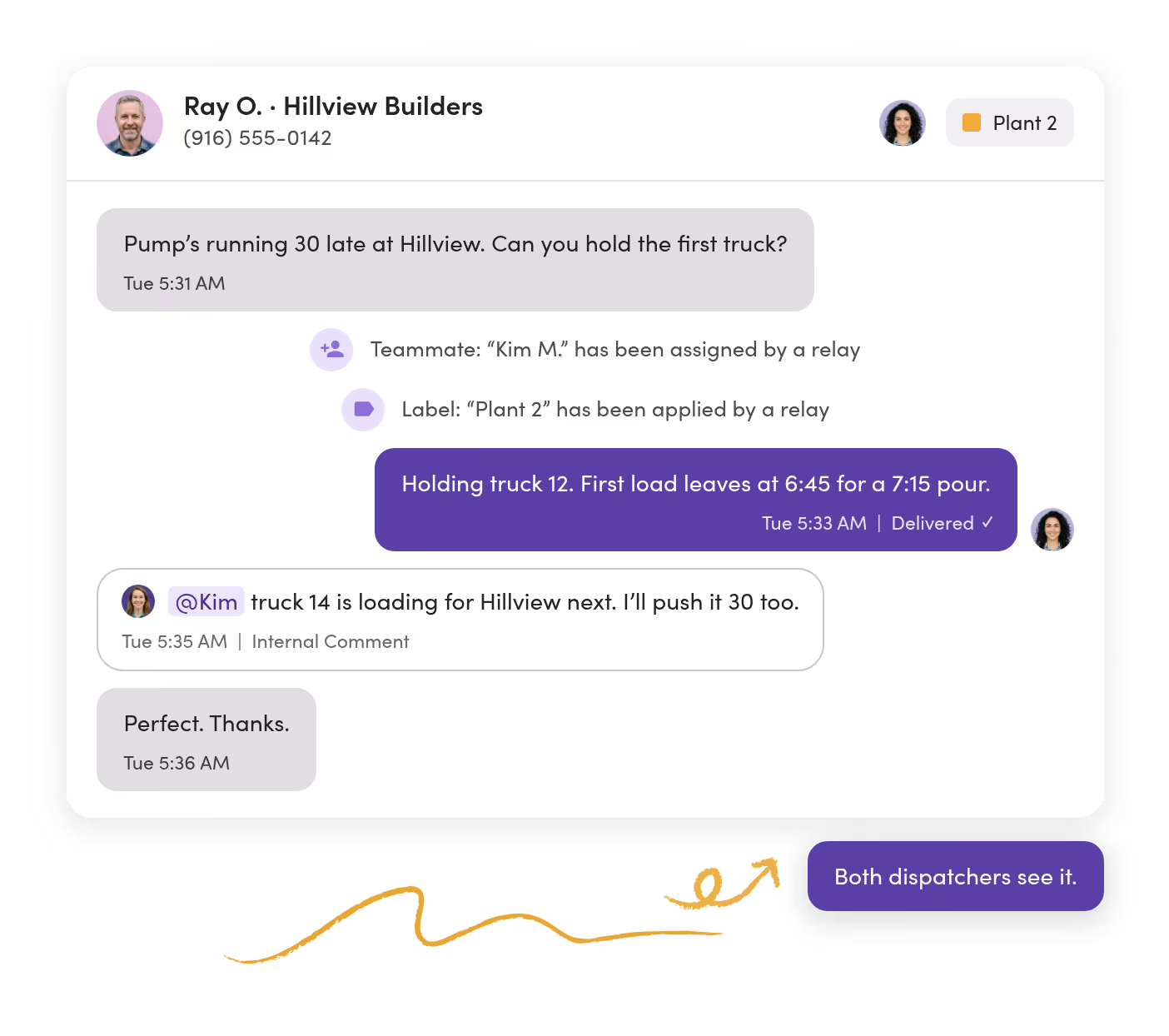
A contractor texts the plant line that the pump’s late. The dispatcher on shift holds the first truck and replies.
9:15 a.m. · Haul change
A loader goes down at the north pit. One text sends six drivers to the south pit, and each reply comes back to dispatch.
1:40 p.m. · Site photo
A framing sub texts a photo of a short header. The super flags it, and the PM owns the reply.
6:10 p.m. · After hours
A customer asks if tomorrow’s paving is still on. An auto-reply says when the office opens, and the scheduler answers first thing.
Plant & dispatch
Pour-day changes get an answer while the truck’s still in the yard.
Contractors and drivers text the plant’s number, and every dispatcher sees the same threads. Nobody waits on whoever has the dispatch phone.
Every text on the plant line has an owner.
A Relay assigns texts to the dispatcher on shift and labels them by plant, so everyone can see who has it.
Dispatch talks it through without the customer seeing.
Internal comments and @mentions sit in the thread, so the next truck gets held without a side call.
Job details go out the same way every time.
Save the site address, pour time, and site contact as a shared template, then fill in what changes.
Subs & job sites
What a sub was told is on record, not on the super’s phone.
Coordinators text subs and suppliers from a company number. The PM and superintendent see every thread and can step in.
Threads are filed by job.
Label each conversation with the job number, then filter the inbox to one site.
The PM and super weigh in without a side text.
Comment, @mention a teammate, and attach the revised detail. The sub sees only your reply.
No sub’s text sits unclaimed.
A Relay labels any conversation without an owner as Needs owner, so it gets picked up the same day.

Crews & announcements
Weather calls reach every crew before anyone drives to the site.
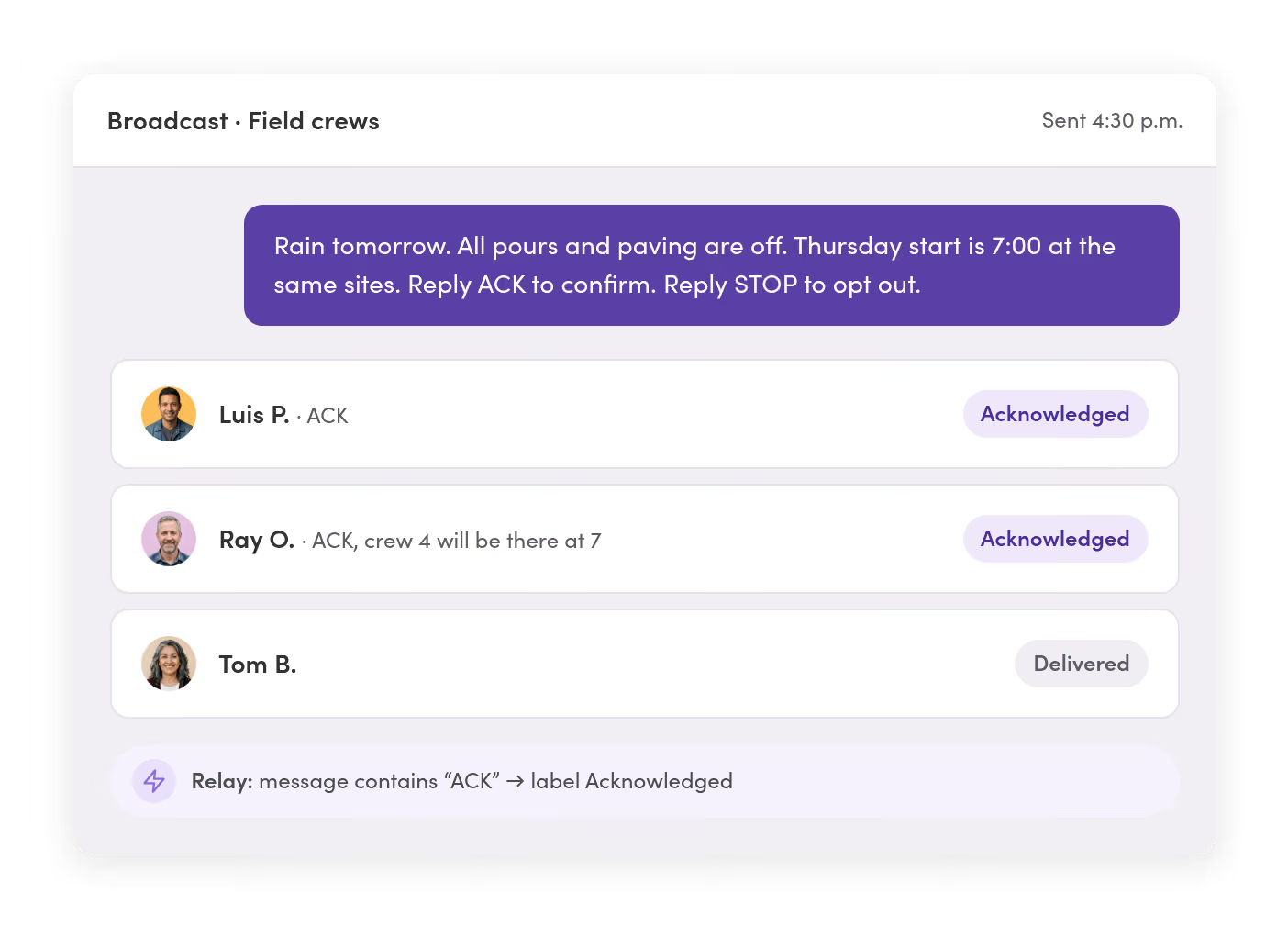
Text the crews who never check email. Pick them by label or saved filter, like company, crew, or site, and each person gets their own copy.
Crews never see each other’s numbers.
Every reply comes back as a private conversation, only to your team.
You can tell who got the word.
A Relay labels every “ACK” reply as Acknowledged. Each message also shows delivered or failed.
The paycheck flyer becomes a text.
Schedule start times, policy updates, and benefits reminders for when they should arrive, with PDFs and photos attached.
Plants & lines
Each plant, pit, and office texts from its own line, in one inbox.
Give every plant, market, or project team its own number, or share one. Set who can see and send on every line, person by person.
Each plant sees its own texts.
Dispatchers at Plant 2 work Plant 2’s line. Ops managers see every line in one place.
A local number for every market.
Add a local number when you open a new yard or market, and keep it in the same workspace.
Start with one plant, then add the rest.
Bring on more lines and teammates as other plants and project teams come on.

Systems sync
Your driver and crew lists stay current without a weekly upload.
Connect your dispatch, ticketing, and accounting systems. Save filtered lists on custom fields like plant, truck, crew, and role.




New drivers and crew members are ready to text on day one.
When someone’s added to your roster sheet or system, MessageDesk creates the contact with their plant, truck, or crew filled in.
The ticket or invoice can send the text.
An event in your ticketing or accounting system, like a load leaving or an invoice going out, can text the customer through Zapier or webhooks.
Your systems stay the system of record.
MessageDesk keeps only the fields your team needs to text the right people, and can send each conversation back by webhook.

Records & compliance
When a load or a change order is disputed, the thread is ready.

Pull the whole thread.
Export any conversation as a PDF with timestamps, internal comments, and photos inline, or export message history as a CSV.

Opt-outs are tracked for you.
When someone replies STOP, MessageDesk records it and blocks texts to that number in the background.

The history stays with the business.
Texts stay on your business numbers when people leave. Only teammates with Owner access to a line can delete messages.
Phone numbers
Add texting to the number on your trucks and tickets.
Most plants and contractors text-enable the main line customers already call. Calls stay on your phone system.
Before you text, you’ll complete our guided carrier registration and we review it before it goes to carriers.



Landline or VoIP number
Turn on texting for the numbers you already use for calling.

Google Voice number
Port it to MessageDesk and keep texting on the same number.
A new number
Pick a local number for a new plant, yard, or market.

Your Twilio account
Connect your existing Twilio numbers to MessageDesk.
Teams in construction & materials
See the setup for the team you run.

Additional resources
More on texting crews, drivers, and subs.

How Construction Companies Text Field Crews and Drivers
How construction teams keep crews and drivers on the same page, from job-site updates to delivery confirmations.
Read more
Top Truck Driver Communication & Trucking Dispatch Software
Seven dispatch software options, plus 10 ways to text drivers and message templates.
Read more
Text Message Archiving for Business: How to Keep an Archive for Every Business Text
What real text message archiving means for a business, and how to keep one searchable, exportable record.
Read moreConstruction and materials texting questions.
No. Your phone provider keeps handling calls, and MessageDesk handles texting on the same number. Nothing changes for the people who call you.
No. They text your number the way they text anyone. Your team works the texts from a browser or the MessageDesk mobile app.
Many already text a dispatcher’s or super’s cell. Put the main line on your tickets, trucks, and voicemail as the number to text, and those texts come to your whole team.
Yes. Each plant, yard, market, or project team can text from its own line in one workspace. Set who sees each line, and let managers see all of them.
Once you submit our guided carrier registration, approval typically takes one to three business days. Getting your website and privacy policy right first keeps a resubmission from restarting the clock.
Yes. Photos, PDFs, and other files come into the thread and stay with the conversation.
Every text stays on your business numbers with a timestamp. Export any conversation as a PDF with photos and internal comments, or message history as a CSV.
Only teammates with Owner access to a line can delete messages. Give everyone else Editor or Viewer access, and the history stays put.
Zapier connects MessageDesk to 9,000+ apps, and webhooks reach any system with an HTTPS endpoint. Events like a load leaving or a new sub can start a text, and conversations can go back to your system.
Yes. Write and send texts in Spanish or any language your crews read. MessageDesk doesn’t translate them for you.
Get every load, pour, and job site text into one inbox.
See your plant lines, crews, and subs set up in MessageDesk in a 20-minute demo.