Contacts
Keep Every Contact Current, Without a Second CRM.
Your CRM, ERP, or HR system is the source of truth. We sync the contacts and custom fields your team needs to text with and keep them current.

Contacts sync
We’re not a CRM, ERP, or HRIS, but we can sync with yours.
CRMs, ERPs, and HRIS systems have distinct roles in your operations. Your team already keeps each one up to date, and we don’t want to add another database for them to manage.





Update it once, where it lives
A new lead, hire, or booking creates a contact with custom fields filled in, all updated by the system that owns the record.
Bring only the details that matter
Names, numbers, and the custom fields you sort people by, like region, crew, status, or renewal month. Everything else stays where it is.
Replies can go back to the record
Texts sent and received can log to the matching CRM record, so the account owner sees the conversation without asking.
Import & export
Move your whole contact list in or out with one CSV.
Starting from a spreadsheet or moving from another tool? Import contacts from a CSV and export contacts whenever you need a copy.
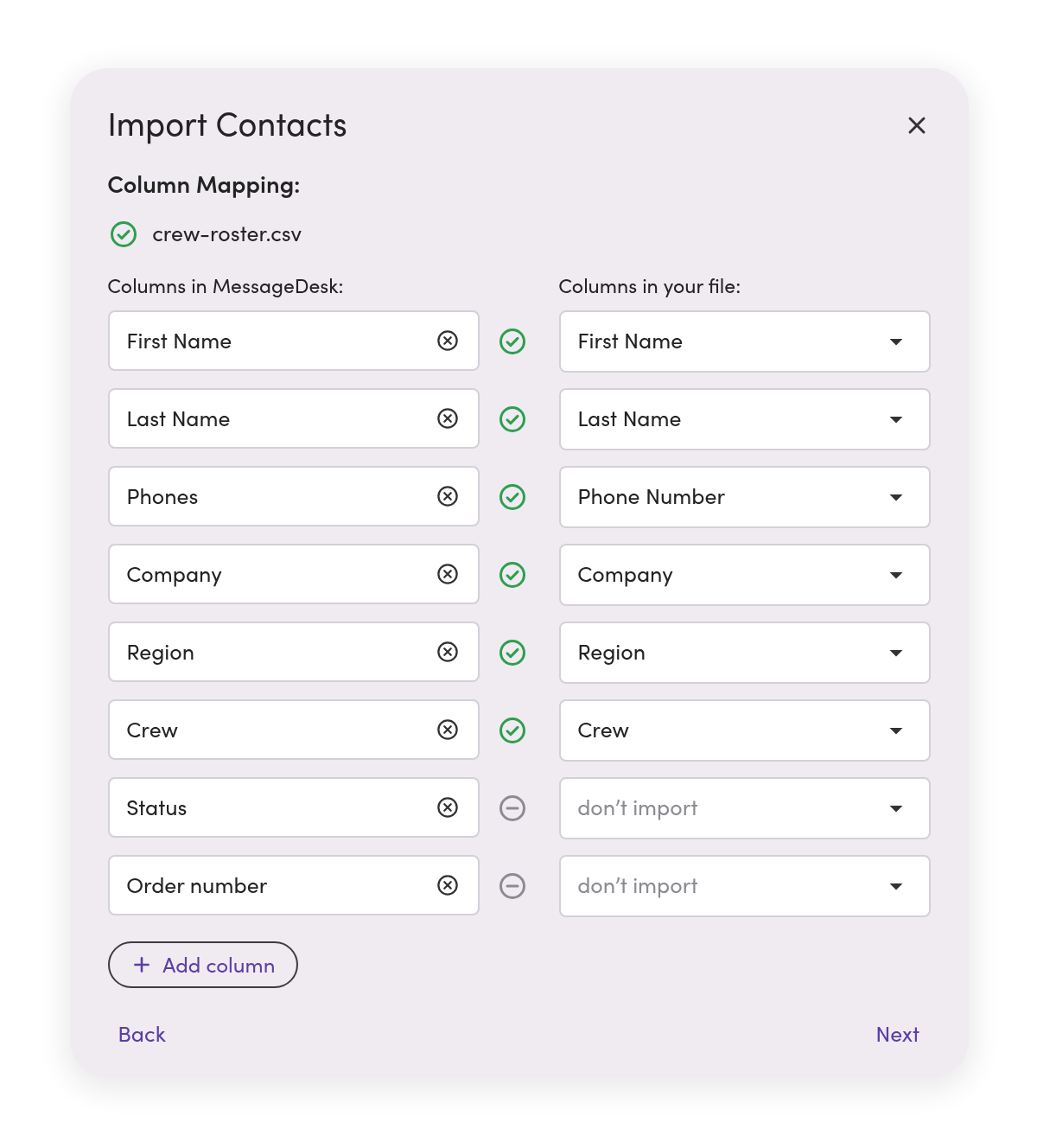
Map it, check it, import it
Map columns to fields, including phone numbers, emails, and addresses. We flag any rows that need fixing before importing anything. Everything gets updated.
Take the whole list with you
Export every contact to CSV with all their phone numbers, emails, addresses, and custom fields. You’ll get a download link in-app and by email when it’s ready.
What a contact holds
Every detail you need to send the right text, in one contact profile.
A contact holds more than a name and a number, and it sits alongside the conversation in the Inbox for full contact context.
Every number and email
Associate multiple phone numbers with a single contact.
Billing and shipping addresses
Save addresses and set a default for billing, shipping, or operations.
Custom fields you define
Set custom fields for region, crew, status, account owner, renewal month, and more.
Room for detailed notes
A long text field can hold rich details like account history or intake notes.

Saved filters
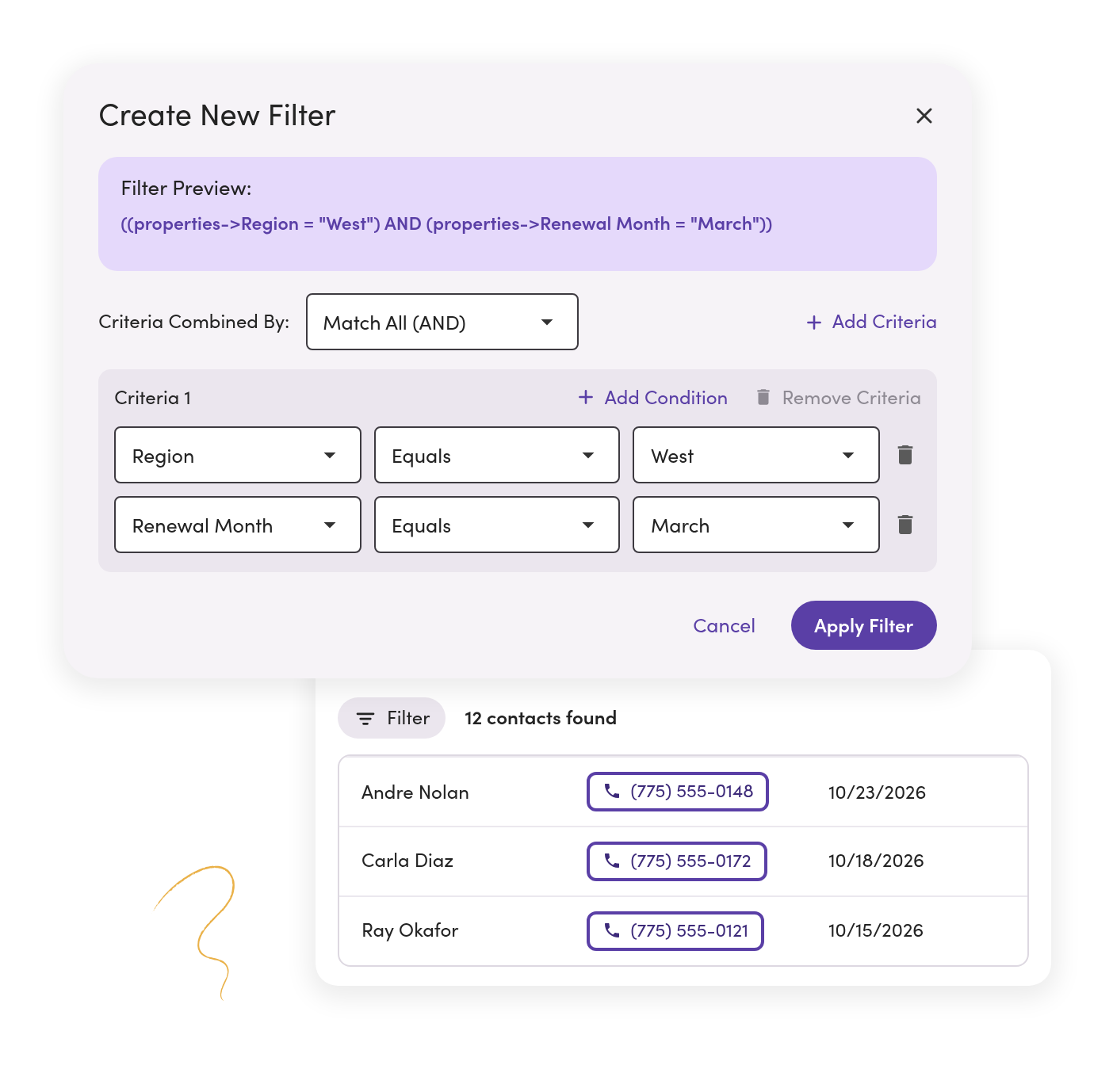
Text the right contact groups from a saved custom filter.
Filter based on custom fields or any other contact info, then save it as a filtered list. Filters sync automatically as contacts get updated.
A route change reaches every driver
Dispatch opens North route drivers, selects everyone, and sends one text. Each driver replies in their own thread.
Narrow it or widen it
Match all for West region and renewal in March. Match any for West or Southwest.
Find who’s missing something
Pull everyone without a value in a field, like contacts with no region set.
“Everything used to run through personal phones. Now, our HR team sees every conversation from candidates to field employees in one shared inbox. It’s faster, more compliant, and nothing gets missed.”
Martine M. · HR Coordinator, Manufacturing Industry
Teams that use this
See how teams like yours use contacts and filters.


Healthcare and long-term care
Reminders and staff texts, kept on record and free of PHI.
See the setup
Contacts questions.
No. Contacts and custom fields live in MessageDesk either way. Add people one at a time or upload a CSV, and connect a CRM later if you want one.
Pick one system to own each list and sync toward the other. If both directions run at once, each update sets off the other. Texts sent and received can still log back to your CRM.
Up to 5,000 rows and 10 MB per CSV, from the web app. Phone is the only column every row needs.
Not yet. A contact export includes every contact in the workspace, with all their fields.
Yes. Open the filter, select the contacts, and send. Each person gets their own copy, and replies come back as private conversations. A very large filter takes more than one send. See broadcasts
No. A saved filter is a list of contacts. Send to it and each person gets a private copy. A group text puts everyone in one shared thread.
Keep your systems. Bring the contacts.
See sync, import, custom fields, and saved filters in a 20-minute demo.
No annual contract on Team or Pro. See pricing