Multi-location teams
Multi-Location Texting: One Shared Inbox for Every Location’s Number
Each location texts customers from the number they already call and sees only its own conversations. Regional managers and admins see across every location from one login.
Keep each location’s phone system. Just add texting.


“Everybody’s so happy to get off the other texting platform… the organization that we needed is back with MessageDesk.”
Admin · Eight-location collision group
Texting today
Customers text the location they know, and every location ends up texting its own way.

A company phone at each location?
Each phone holds one location’s texts. The regional office can’t see them, and on the manager’s day off, customers wait.

Personal cells or one Google Voice login?
Staff text from their own phones, or every location shares one login. Nobody can tell who answered, and the texts leave when people do.

Location lines that can’t text?
Customers text the number on your sign and website. If that line can’t text, or only one person’s login sees its texts, the rest of the team never does.

A texting tool built for one location?
Some tools send under one location’s name, or only send outbound. Customer replies go to the wrong location, or nowhere.
Every location
Each location answers its own customers, and nothing waits on one person’s phone.
7:40 a.m. · Collision center
A customer texts the Mesa center’s main line about drop-off. The Mesa estimator on the repair order owns the reply.
10:15 a.m. · Insurance office
A policyholder replies to a renewal reminder from the Norfolk office. Norfolk’s service team owns it, and no other office sees it.
1:30 p.m. · Retail location
A consignor texts photos of three items to the downtown location. The manager labels it, and an associate owns the reply.
6:05 p.m. · Clinic after hours
A patient texts the west clinic after close. An auto-reply gives tomorrow’s hours, and whoever opens at West owns the thread.
Lines & access
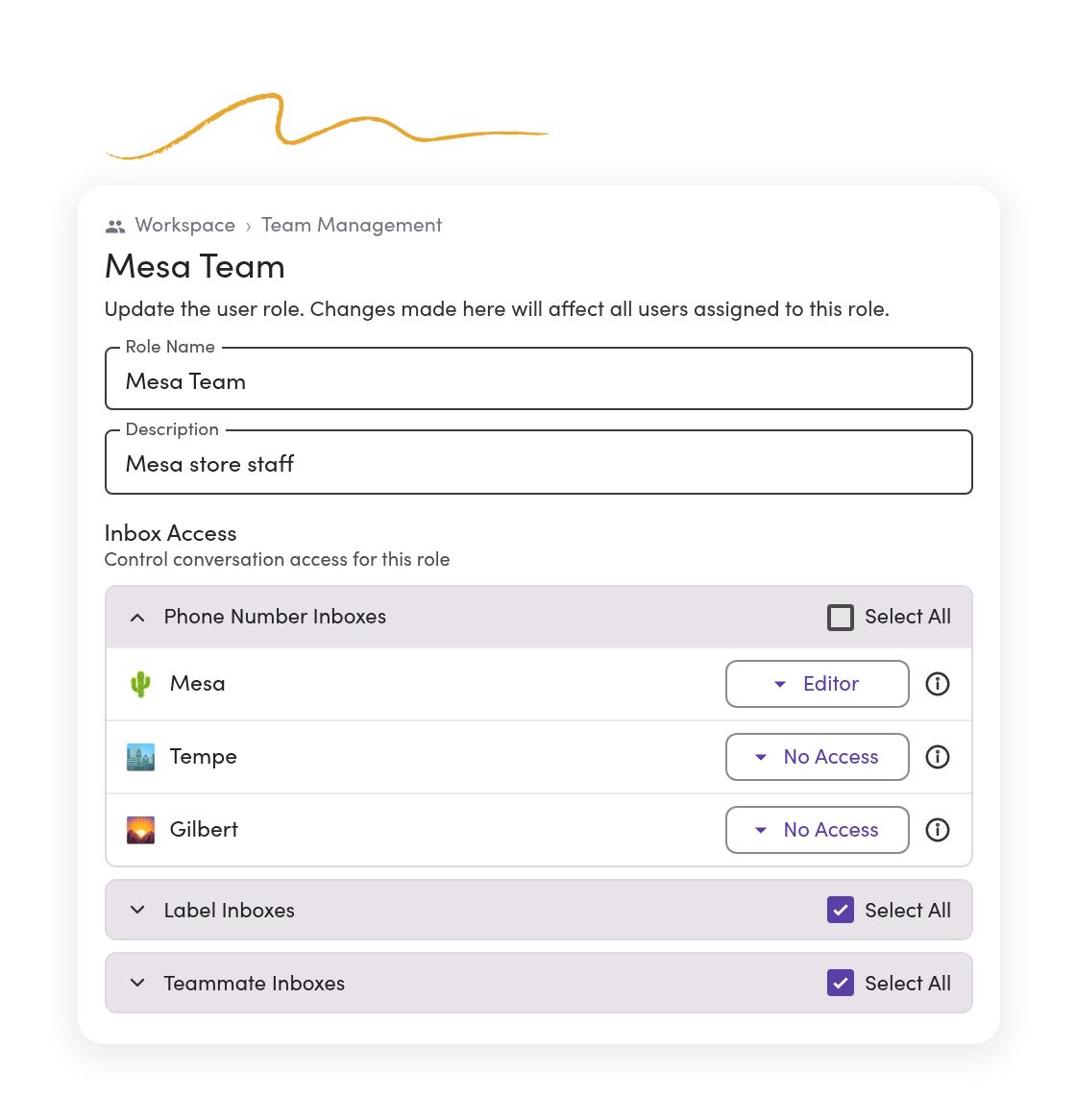
Every location keeps its own line, and each person sees the lines they work.
Text-enable the number each location already has. Then set who can see and send on every line, person by person.
Each location answers on its own number.
Customers text the number on your sign, website, and invoices. Connect up to 48 lines to one workspace.
One location can’t read another’s texts.
Give the Mesa team the Mesa line. Tempe stays with Tempe.
Regional managers work every line.
See every location’s conversations in one view, or pick one line to focus on.
Workspaces
Share customers across locations, or keep each location’s book separate.
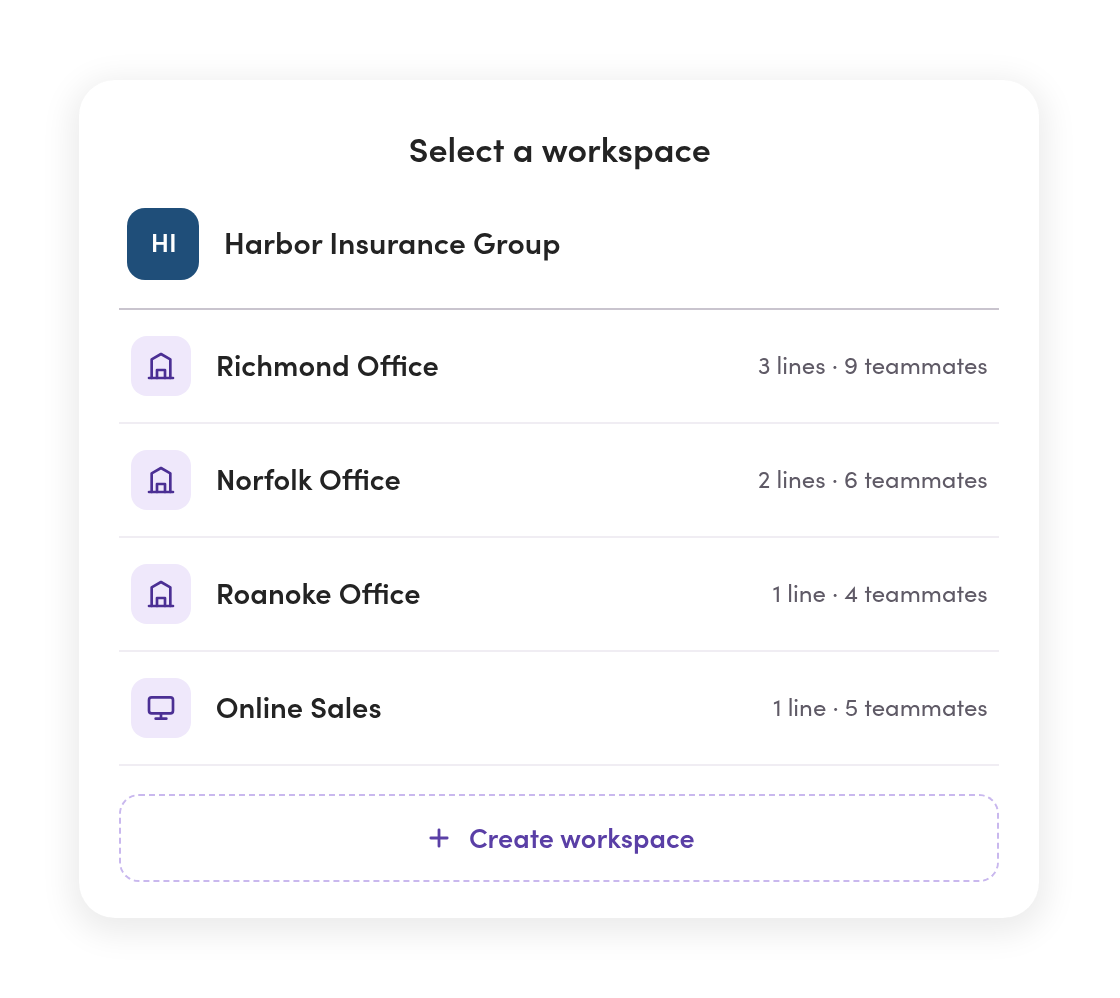
Most groups run every location in one workspace. When locations are separate businesses, like franchisees, each one gets its own workspace under one company account.
Shared customers stay in one workspace.
Locations share one contact list, and line access decides who sees which conversations.
Separate businesses get separate workspaces.
Each location keeps its own contacts, lines, templates, and history. Nothing crosses between them.
One company account sits over all of them.
Admins create each location’s workspace and switch between them without signing out.
Templates & routing
Every location sends the same approved texts, and replies go to the right team.
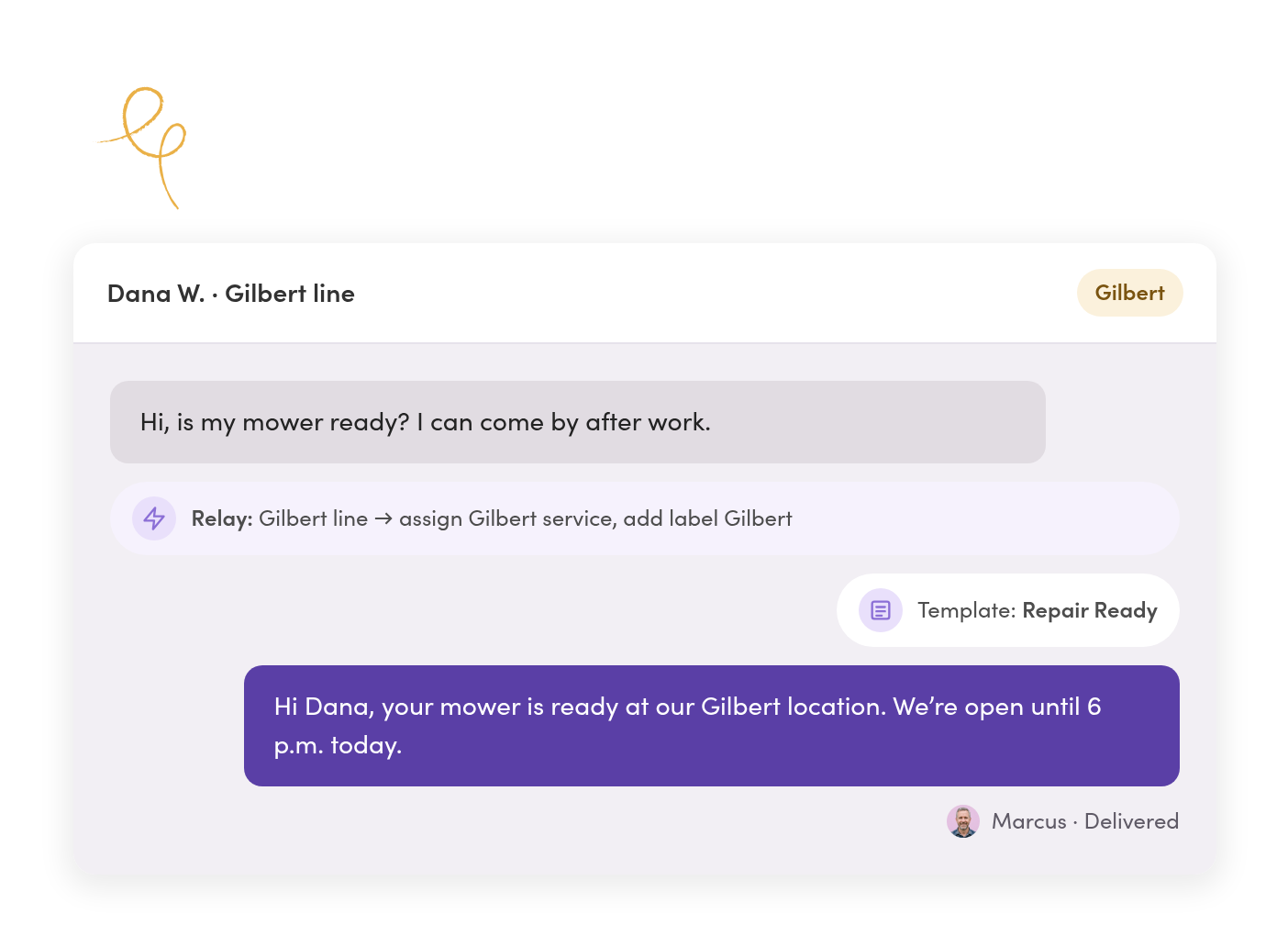
Build templates, labels, and Relays once. Each location uses them on its own line.
Templates fill in the details.
Tags add the customer’s name and the location they’re texting, so every location says it the same way.
Each line routes to its own team.
A Relay assigns new texts on the Gilbert line to the Gilbert team and labels them, so nothing sits unassigned.
After hours, each location answers for itself.
Set an auto-reply on each line with that location’s hours. The text stays unread for whoever opens in the morning.
Pilot & rollout
Start at one location, then roll out when it works.
Most groups prove it at one location first. When the setup works there, the next location starts with it.
Pilot one location.
Text-enable that location’s number and invite its team. Customers keep texting the number they know.
Settle the setup.
Agree on the roles, templates, labels, and Relays that work. That becomes your standard.
Copy it to the next location.
Export your templates and import them at the next location. Our team helps set up its roles and labels.
Train, then go live.
Walk each team through it before invites go out, so day one starts with answers instead of questions.
Oversight & teammates
See how every location is texting, and control who has access.
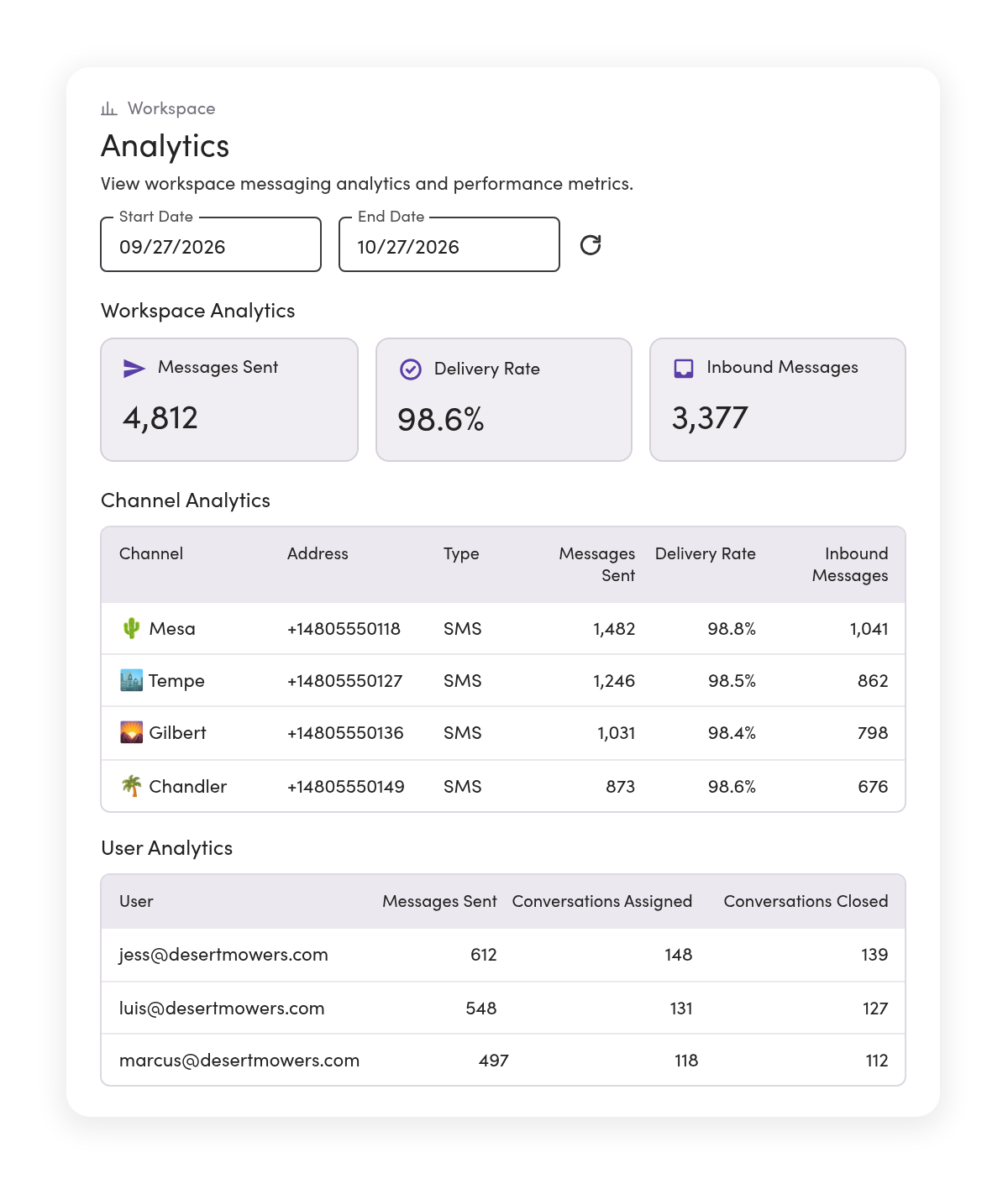
Analytics break down texts by line and by teammate. Admins add and remove people without touching any other location.
Compare locations line by line.
See messages sent, delivery rate, and inbound volume for each location’s line over any date range.
When someone leaves, their customers don’t.
Remove the teammate and reassign their conversations. The texts stay with the location’s number.
Teammates sign in with Microsoft.
Connect Microsoft Entra ID single sign-on, and require MFA for everyone who texts.
Records & compliance
When a manager leaves, the location’s texts stay.

Opt-outs are tracked for you.
When a customer replies STOP, MessageDesk records it and blocks texts to that number across your lines.

Export by location.
Filter message history to one location’s line, or all of them, and export it as a CSV or PDF.

History stays with the business.
Every text stays on your business numbers with audit-ready conversation history, not on someone’s personal phone.
Phone numbers
Every location keeps the number on its sign.
Text-enable each location’s landline or VoIP number, connect Twilio numbers, or add a new number where a location needs one. Calls stay on your phone system. Guided carrier registration helps get your website and opt-in language ready first.



Landline or VoIP number
Turn on texting for the numbers each location already uses for calling.

Google Voice number
Port it to MessageDesk and keep texting on the same number.
A new number
Pick a local or toll-free number for a location that doesn’t have a line yet.

Your Twilio account
Connect your existing Twilio numbers to MessageDesk.
Multi-location teams in your industry
See how teams like yours text.


Regulated industries
Insurance, finance, and law offices that keep every text on record.
See the setup
Healthcare & long-term care
Clinic groups and care homes coordinating staff and appointments by text.
See the setupAdditional resources
More on texting across locations.

How Multi-Location and Franchise Businesses Text Across Locations
Two ways to set up texting across locations, and how to roll it out.
Read more
Car Dealership Text Messaging: Sales, Service, and Staff
How dealership sales and service teams text customers and each other.
Read more
Google Voice Alternatives | Google Voice vs Competitors
What to use when one Google Voice login is covering several locations.
Read moreMulti-location texting questions.
Yes. MessageDesk adds texting to each location’s landline or VoIP number. Calls stay on your phone system, and customers keep texting the number they know.
Only if you give them access. Set who can see and send on every line, person by person. Regional managers can see across all of them.
Use one workspace when your locations share customers. Give each location its own workspace when it’s a separate business, like a franchisee, whose contacts and history should never cross. Sales can help you choose.
Yes. Most groups pilot one location on its existing number, then add locations as each one is ready.
Export your templates as a CSV and import them at the next location. Our team helps set up each new location’s roles, labels, and Relays.
Registration happens per business, not per location. If your locations are separate legal entities, like franchisees, sales will work out how each one registers. MessageDesk reviews every submission before it goes to carriers.
Admins invite teammates, set their roles, and remove them when they leave. With Microsoft Entra ID single sign-on, everyone signs in with their work account.
Yes. Analytics show messages sent, delivery rate, and inbound volume by line and by teammate, for any date range.
If the location has its own workspace, cancel its subscription. The workspace locks at the end of the billing period, and MessageDesk keeps its data for 90 days before deleting it.
MessageDesk is a SOC 2 Type II-certified platform with role-based access controls and Microsoft Entra ID single sign-on. Sales can share the report and walk IT through your security checklist.
Start with one location’s shared inbox, then roll out to the rest.
See how your locations, lines, and access would work in MessageDesk in a 20-minute demo.
No annual contract on Team or Pro. See pricing