Landline & VoIP
Text From Your Landline & VoIP Numbers in One Shared Inbox.
Keep RingCentral, Zoom Phone, 8x8, or whatever runs your calls. Everyone texts your existing numbers, and your whole team answers.
Can your office number text?
Free, no signup. Shows the carrier, line type, and if we can text-enable it.
Works with the phone system you already pay for
Calls stay with your provider. Only texting moves to MessageDesk.











“We kept our same numbers and VoIP provider and were texting in a couple days. No downtime, no added configuration or headaches.”
Greg G. · IT Administrator, Legal Practice
Calls & texts
Your phone system keeps the calls. Your team gets the texts in an Inbox.
MessageDesk text-enables the numbers you already own. Nothing about how your phones ring changes.

Stays the same
Your numbers. The ones on your website, trucks, signs, and paperwork.
Your phone provider. Same account, same bill for calling.
Your calls. Ring groups, menus, and voicemail route the way they do now.
Your desk phones and calling apps. Nobody relearns how to take a call.
Changes for texting
Texts come into MessageDesk. Once a number is connected, its texts show up here instead of in your phone app.
Every number shares one inbox. Main lines and direct lines, side by side.
Every text has an owner. Your team texts from the web or the mobile app.
You register for business texting. A guided form, reviewed by MessageDesk before it goes to carriers.
Texting today
Your phone system handles calls well. Texting is where it stops working.
Most phone systems text one number at a time, through one login, or not at all.

Does the main line text at all?
Customers text the number on your website and trucks, and it goes nowhere. Landlines and many office lines can’t text until someone turns it on.

Texts stuck behind one login?
Phone systems text number by number. Each number is its own silo, and only whoever signs in to it can see or answer.

Calls on the desk, texts on a cell?
Calls ring the office line, and texts go to company cell phones. When someone’s off for the weekend, their texts wait on their phone.
Coverage & handoffs
Every text to your office numbers has an owner, even when they’re out.
7:40 a.m. · Clinic front desk
A parent texts the number on your website to move an appointment. The front desk replies and the thread is assigned to them.
10:15 a.m. · Auto transport
A customer texts the direct line of an agent who’s off today. A teammate sees it in the shared inbox and takes it.
1:30 p.m. · Equipment rental
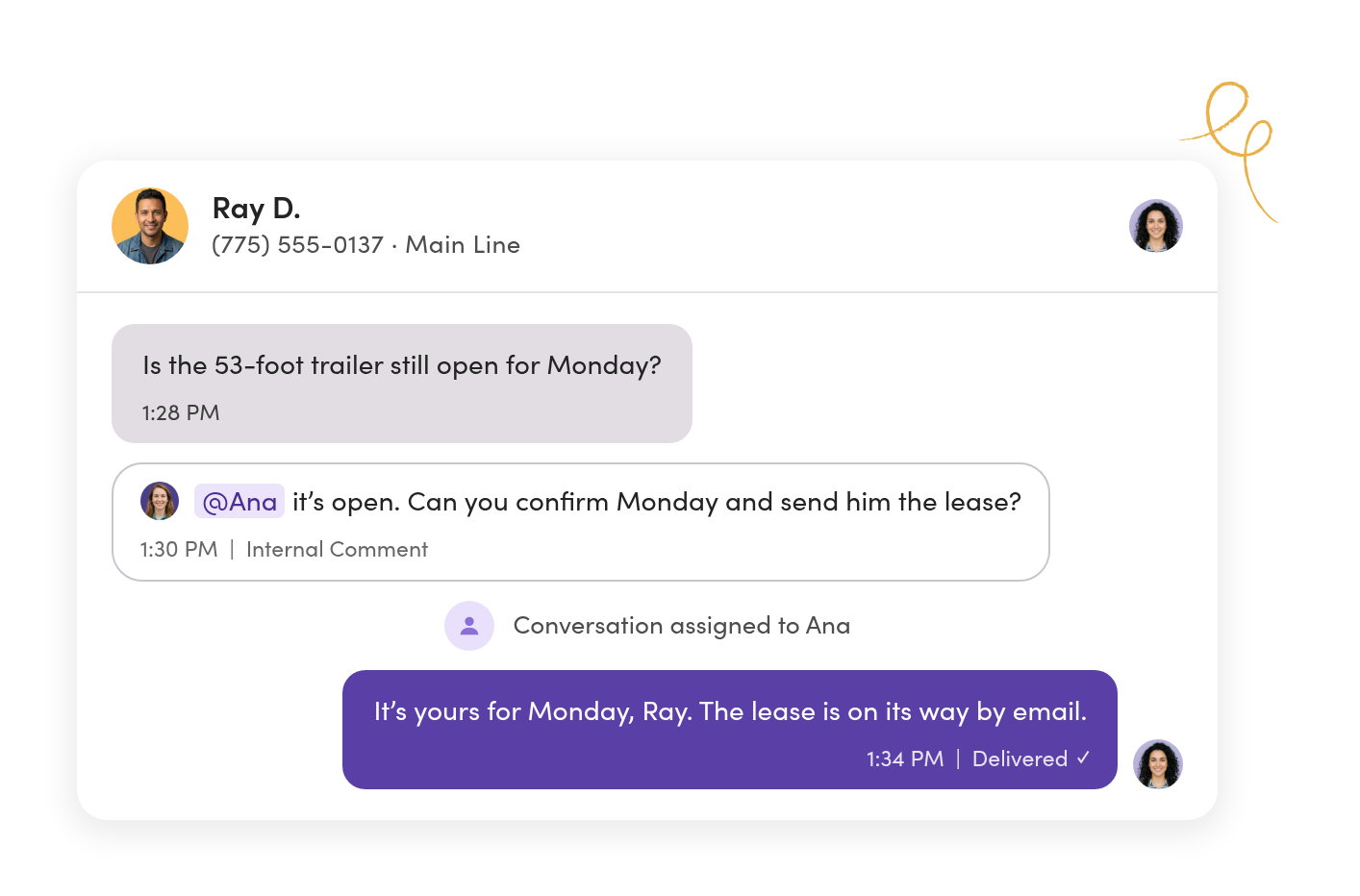
The owner gets a lease question on the published line. He leaves a comment for his coordinator and assigns her the thread.
6:05 p.m. · Contractor’s office
A homeowner texts after close and gets the after-hours reply. The thread waits as unread for whoever opens up in the morning.
Lines & access
Every office number in one inbox, with the right people on each.
Connect the main line, the department lines, and each person’s direct number. Your team sees the lines they work and nothing they shouldn’t.
Nobody signs in to a different number to check texts.
Every connected line shows up in one inbox. Filter to one line when you need to.
HR’s line stays HR’s.
Set Owner, Editor, Viewer, or No Access for each person on each line.
A new office is one more line, not a new system.
Host its number and add it to the same workspace, under the same roles.

Ownership & handoffs
The number everyone has stops depending on one person.
Assign each conversation to whoever’s handling it. When they’re out, someone else picks it up with the whole history in front of them.
Hand off a customer without forwarding a screenshot.
Assign the thread and the history goes with it.
Ask a teammate in the thread, out of the customer’s view.
Internal comments and @mentions sit beside the texts. Customers never see them.
Everyone opens their day on their own list.
My Inbox shows each person what’s assigned to them and where they were mentioned.
After hours & routing
Texts after close get a reply tonight and an owner by morning.
Relays are automations you switch on. Start from a template and set the hours, the lines, and who gets what.
Customers know you got their text.
An after-hours reply goes out from the same number, and the thread stays unread for the morning.
Texts to each line go to the people who work it.
Route by phone line to assign a teammate and add a label as each text comes in.
Nothing sits unclaimed.
Flag threads nobody has picked up so they don’t wait for someone to notice.

Getting started
What it takes to switch to MessageDesk.
About one to three business days
Register with the carriers
Submit your business details. We help you get compliant for business texting.
Minutes, once approved
Connect your numbers
Host, port, connect Twilio, or get new text-only local or toll-free numbers.
Same day
Add your team and set access
Invite teammates and assign their roles. Narrow access by number and label.
Once your numbers are live
Start texting
Import contacts and message history, then switch on the Relays you want.
Changing phone providers later? Tell the new provider that texting stays with MessageDesk, and your texts keep working.
Hosting vs. porting, explained →Records & security
Every text stays on your business numbers and on the record.

Opt-outs are tracked for you.
When someone replies STOP, MessageDesk records it and blocks texts to that number across your lines.

The history stays when people leave.
Texts live on your business numbers, not someone’s phone. Search any thread, or export it to CSV or PDF.

IT can sign off.
A SOC 2 Type II-certified platform with role-based access controls and audit-ready conversation history.
Teams & industries
See how teams like yours set up their office lines.



Landline and VoIP texting questions.
No. Calls keep ringing through your current provider, with the same routing and voicemail. MessageDesk only takes on texting for the numbers you connect.
Every number has a calling side and a texting side. Hosting connects the texting side to MessageDesk while your provider keeps the calling side. Customers text the number they already have, and nothing changes for them.
No. Once a number is connected, its texts come into MessageDesk and stop showing in your phone app. Your team texts from MessageDesk on the web or their phone, and keeps calling the way they do now.
Yes. Connect the main line and each direct line, then choose who sees which. A person can work only their own number, or a team can share one.
Carrier registration typically takes one to three business days once your website is compliant. Hosting can finish in minutes or take up to 72 hours.
Run it through the free check first. Verizon One Talk lines can’t be text-enabled. If yours can’t, you can add a new local or toll-free number for texting, and our team will talk you through the options.
Tell your new provider that texting on the number stays with MessageDesk. If they move texting along with calls, your texts stop until you reconnect the number.
Yes. Hosting is reversible. When you stop, texting goes back to your phone provider and your calls are never touched.
No. MessageDesk bills per teammate, not per phone number.
No. MessageDesk is for texting, and calls stay in your phone system. Many teams keep the phone app open for calls and MessageDesk open for texts.
Connect your office numbers to one shared inbox.
See your lines, your team, and your phone system working together in a 20-minute demo.
No annual contract on Team or Pro. See pricing