Switching texting tools
Bring Your Numbers, Contacts & Texts to a Shared Inbox Built for Operations.
Move your numbers, history, and contacts. Then give every reply an owner, every teammate the right access, and every conversation a record.
Keep your numbers. Bring your history.

“Everybody’s so happy to get off the other texting platform… the organization that we needed is back with MessageDesk.”
Admin · Eight-location collision group
Numbers & history
Everything you have in your old tool comes with you.
Switching shouldn’t mean starting with a blank inbox. What changes is how your team works the replies.
Comes with you
Your numbers. Host or port them, and customers keep texting the same numbers.
Your past texts. Import message history so threads pick up where they left off.
Your contacts, templates, and labels. Import them from your old tool’s exports.
Your opt-out list. Anyone who replied STOP before stays blocked on every line.

Changes for the better
Every reply has an owner. Nothing sits in a list nobody’s watching.
Each person sees the lines they should. HR, dispatch, and each location keep to their own.
The conversation about the text stays with the text. Internal comments and @mentions sit in the thread.
Nobody rations texts. Pricing is per teammate, with unlimited one-on-one texting.
Texting today
Most texting tools were built to send. Your team spends the day answering.
They cover the basics of business texting. They weren’t built for an operation where many people work the same lines.

Built for blasts?
Campaign tools send to a list well. The replies come back to one place, and nobody owns them.

Everyone on one login?
You can’t tell who replied, two people answer the same text, and there’s no keeping HR out of dispatch.

Replies buried on page three?
New texts push older ones down the list. A reply that scrolls out of view is out of sight, out of mind.
Ownership & coverage
The same texts as before, with someone on every one.
8:05 a.m. · Collision center
A customer texts a photo of new damage. It goes to the estimator who owns the repair, with the earlier texts right above it.
10:40 a.m. · Home care
A caregiver’s reply comes in while the office is busy. It stays flagged until a coordinator claims it, so it can’t scroll away.
1:20 p.m. · Staffing agency
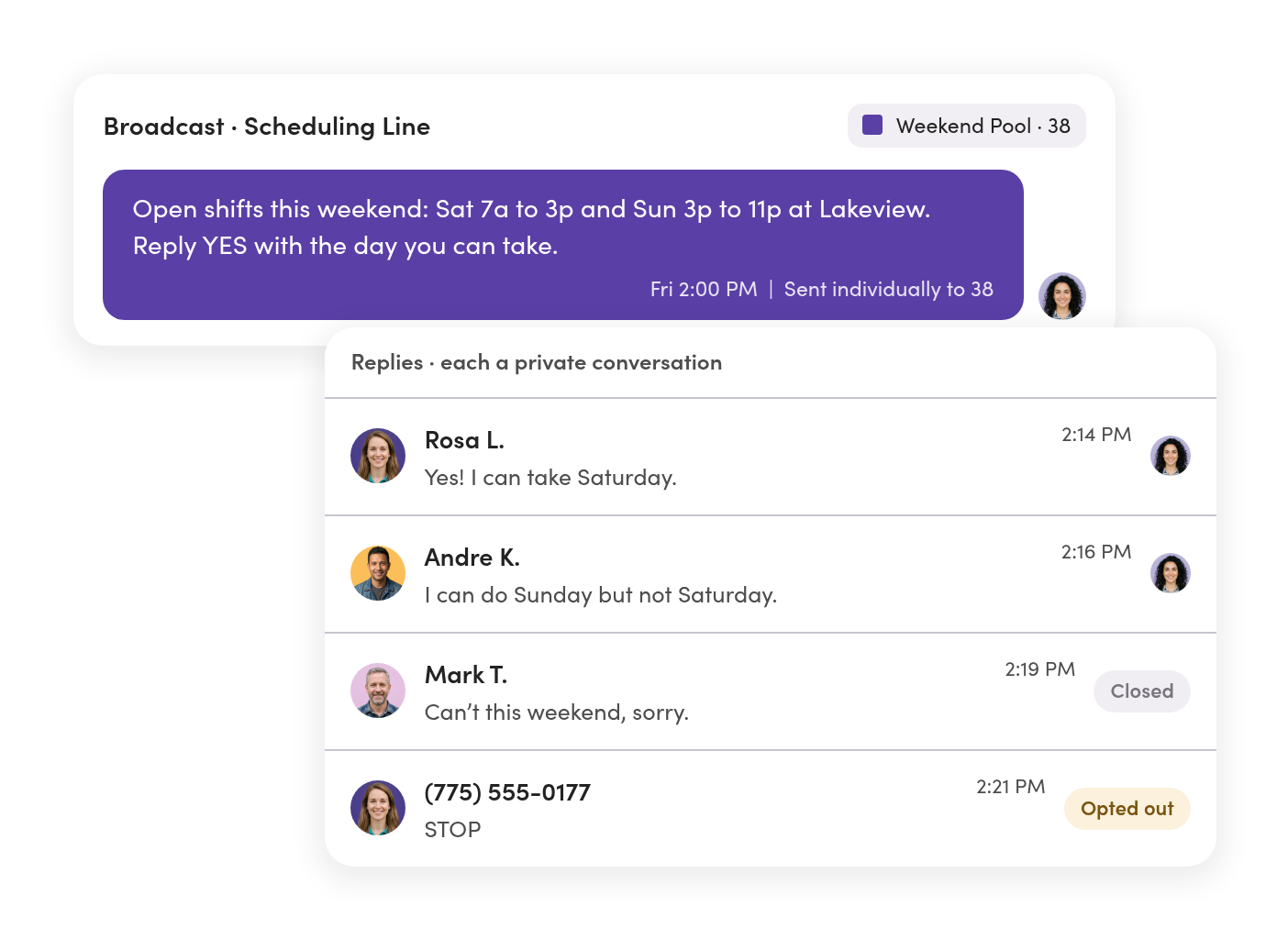
An open shift goes out to the list. Each reply comes back as its own private thread, and the first yes gets assigned.
4:55 p.m. · Retail locations
Each store answers its own customers on its own number. The regional manager sees all of them in one place.
Ownership & handoffs
Replies don’t get buried. They get an owner.
Assign each conversation to whoever’s handling it. Unread and unassigned threads stay in view until someone takes them.
Everyone starts the day on their own list.
My Inbox shows what’s assigned to you and where you were mentioned.
Two people don’t answer the same text.
Every thread shows who owns it and who sent each reply.
Unclaimed texts get flagged.
Switch on a Relay that flags threads nobody has picked up.

Lines & access
One workspace, and each team sees only its own texts.
Give everyone their own login and a role. Then decide who works which lines.
No more shared password.
Every teammate signs in as themselves, so every reply has a name on it.
HR’s line stays HR’s.
Set Owner, Editor, Viewer, or No Access for each person on each line.
Locations keep to their own customers.
Each location texts from its own number, and a regional lead can see across all of them.

Broadcasts & replies
Send to the whole list. Answer each reply on its own.
Broadcasts still go out to many people at once. Every reply comes back as a private thread your team can assign and close.
No reply-all.
Each person gets their own copy, and replies come back only to you.
The texts you send every week are ready to go.
Bring your templates over, add personalization tags, and schedule sends.
STOP means stop, on every line.
Opt-outs are recorded and blocked across your lines, including scheduled sends.
Setup & timeline
Switch in four steps, without a day of missed texts.
Keep your old tool running while your numbers move. Texting stays with it until the move completes.
Register your business
Start here, since US numbers need an approved registration before they can move. We review it before it goes to carriers, and approval typically takes one to three business days once your website is compliant.
You, with our review
Move your numbers
Host a number if your phone provider still runs its calls. Port it if the old tool owns it. Either way, you sign the authorization in the app and we submit it.
MessageDesk & your old provider
Import your data
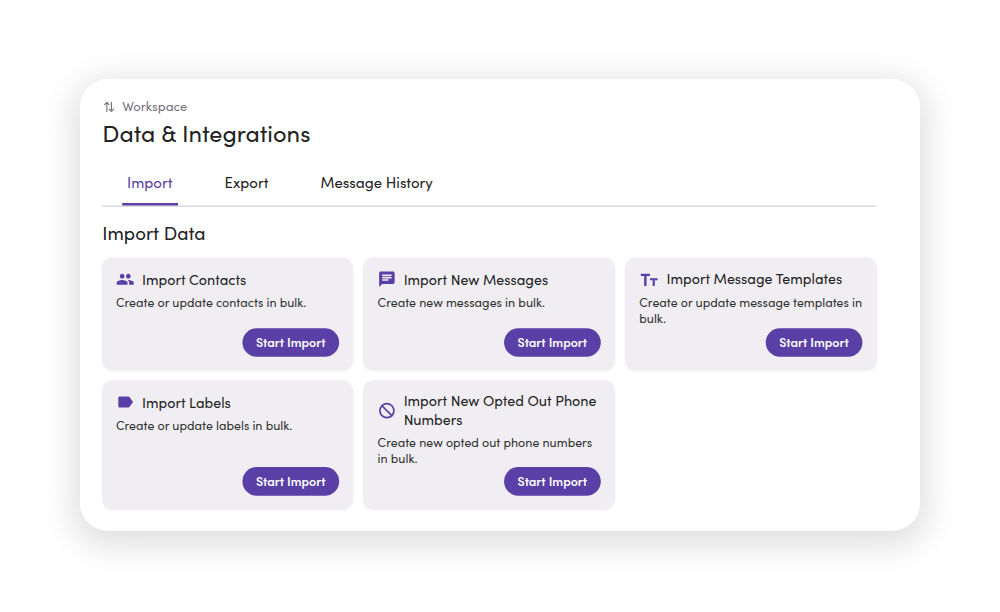
Export from your old tool, then import messages, contacts, templates, labels, and opt-outs as spreadsheets on the web.
You
Bring in your team
Invite teammates with their own logins, set roles, and choose who works which lines.
You
Timing: hosting can finish in minutes or take up to 72 hours. Ports take several business days.
Hosting vs. porting, explained →Records & security
Every text stays on your business numbers and on the record.

Find anything anyone said.
Search messages and internal comments across every line, or export any thread to CSV or PDF.

The history stays when people leave.
Conversations belong to the business number, so a departure is a reassignment, not a gap.

IT can sign off.
A SOC 2 Type II-certified platform with role-based access controls and audit-ready conversation history.
Teams & industries
See how teams like yours run their texting.



Comparing tools? See how MessageDesk stacks up against Podium, Heymarket, SimpleTexting, EZTexting, and Textmagic.
Questions about switching texting tools.
Yes. If your phone provider still handles the number’s calls, MessageDesk hosts it for texting. If your old texting tool owns the number, you port it. Customers keep texting the same number either way.
Ask where the number’s calls go. If they ring a phone system you’re keeping, host it. If the old tool is the number’s only home, port it and forward calls to any phone that can answer. Our team will confirm on a call.
Keep your old tool running until each number finishes moving. During a port, texting stays with your current provider until it completes.
Yes. Export your message history from the old tool and import it as a spreadsheet on the web, so threads pick up where they left off. Large histories can go in as several files.
Import your opt-out list. MessageDesk blocks those numbers on every line in the workspace, so nobody who said STOP hears from you again.
Yes. You complete MessageDesk’s guided registration, and we review it before it goes to carriers. One approved registration covers every local number you connect.
No. MessageDesk bills per teammate, with unlimited one-on-one texting and no per-number fees.
Yes. Many teams move one line or one location, get it working, and then move the rest.
No. They text the same numbers they always have. Nothing to download and nothing to opt into again.
Registration typically takes one to three business days once your website is compliant. Hosting can finish in minutes or take up to 72 hours, and ports take several business days.
Switch to an inbox your whole team can work.
See your numbers, history, and team set up in MessageDesk in a 20-minute demo.
No annual contract on Team or Pro. See pricing