HR, staffing, and recruiting
Fill Shifts, Staff Roles & Reach Employees From One Shared Text Inbox
Text employees and candidates from the numbers you already have. See every reply, who’s handling it, and what was said.
Keep your phone system. Just add texting.


“Everything used to run through personal phones. Now, our HR team sees every conversation from candidates to field employees in one shared inbox. It’s faster, more compliant, and nothing gets missed.”
Martine M. · HR Coordinator, Manufacturing Industry
Texting today
People don’t answer calls, so your team texts. Where do those replies go?

Texting with company phones?
A company cell phone gets passed around the office and goes home with whoever’s on call.

Texting from personal phones?
Employees and candidates text whoever reached out first. When their contact leaves, the conversations go with them.

Using a mass-text tool?
It sends a message to everyone, but replies pile up in a list with no owner or quick way to find what you need.

Is your office number textable?
Office numbers need to be text-enabled, and many VoIP systems only text from one person or one number.
What a new day could look like
Every reply gets an owner, from the first call-out to the last shift of the night.
6:10 a.m. · Call-out
A caregiver texts that she’s sick for her 7:00 visit. The scheduler sees it, labels it, and starts the shift fill.
6:20 a.m. · Shift fill
The open shift goes to every available employee in the region. The first yes is assigned to the coordinator.
11:00 a.m. · Interviews
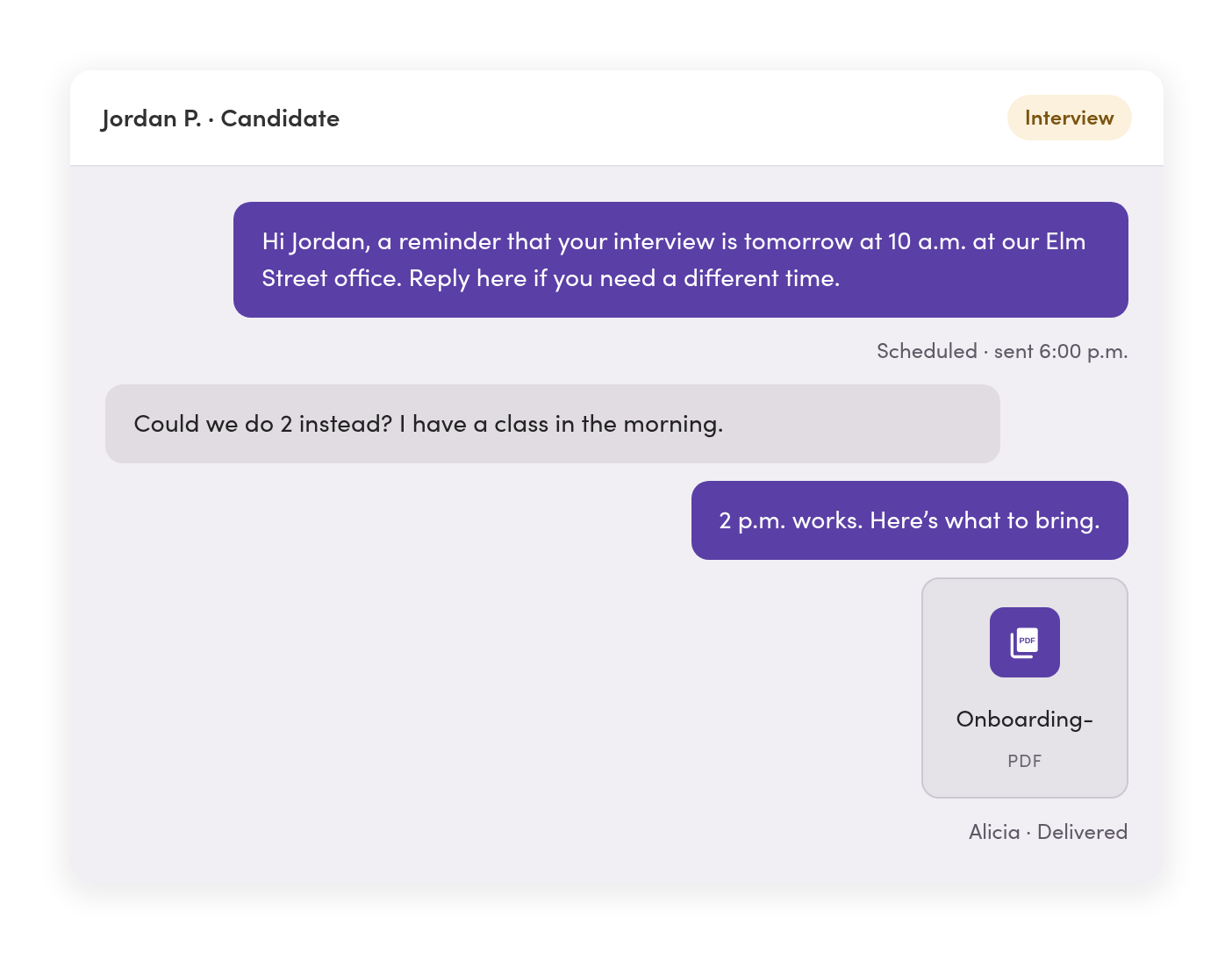
A scheduled interview reminder goes out. A candidate asks to move to 2 p.m., and the recruiter who owns the thread replies.
8:30 p.m. · After hours
An employee texts with a question. An automatic reply gives the on-call number, and the text waits as unread for the morning.
Replies & routing
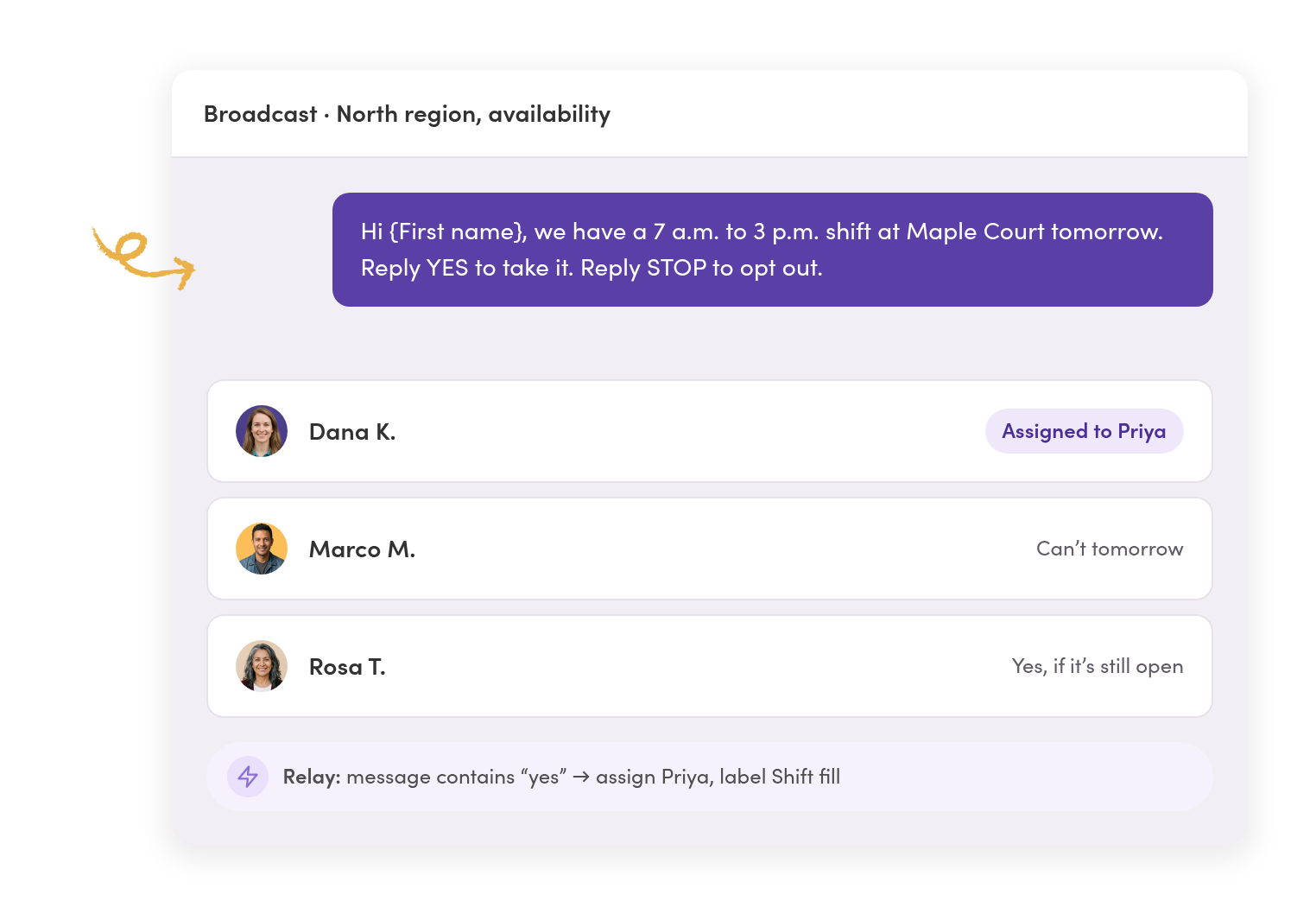
Send the open shift once. The first yes gets booked, not buried.
Select employees by label or saved filter, like region, role, or shift, and text all of them at once. Each reply starts a new private conversation.
Replies go straight to the coordinator.
Turn on a Relay that spots “yes,” assigns the coordinator, and labels the thread. Nobody has to sort the replies first.
Employees never see each other’s replies.
One employee’s “can’t today” stays between them and your team. There’s no group thread full of strangers.
Everyone else hears the shift got filled.
Select the remaining threads and send “this shift is filled” as one reply. Each person gets it privately.
Lines & access
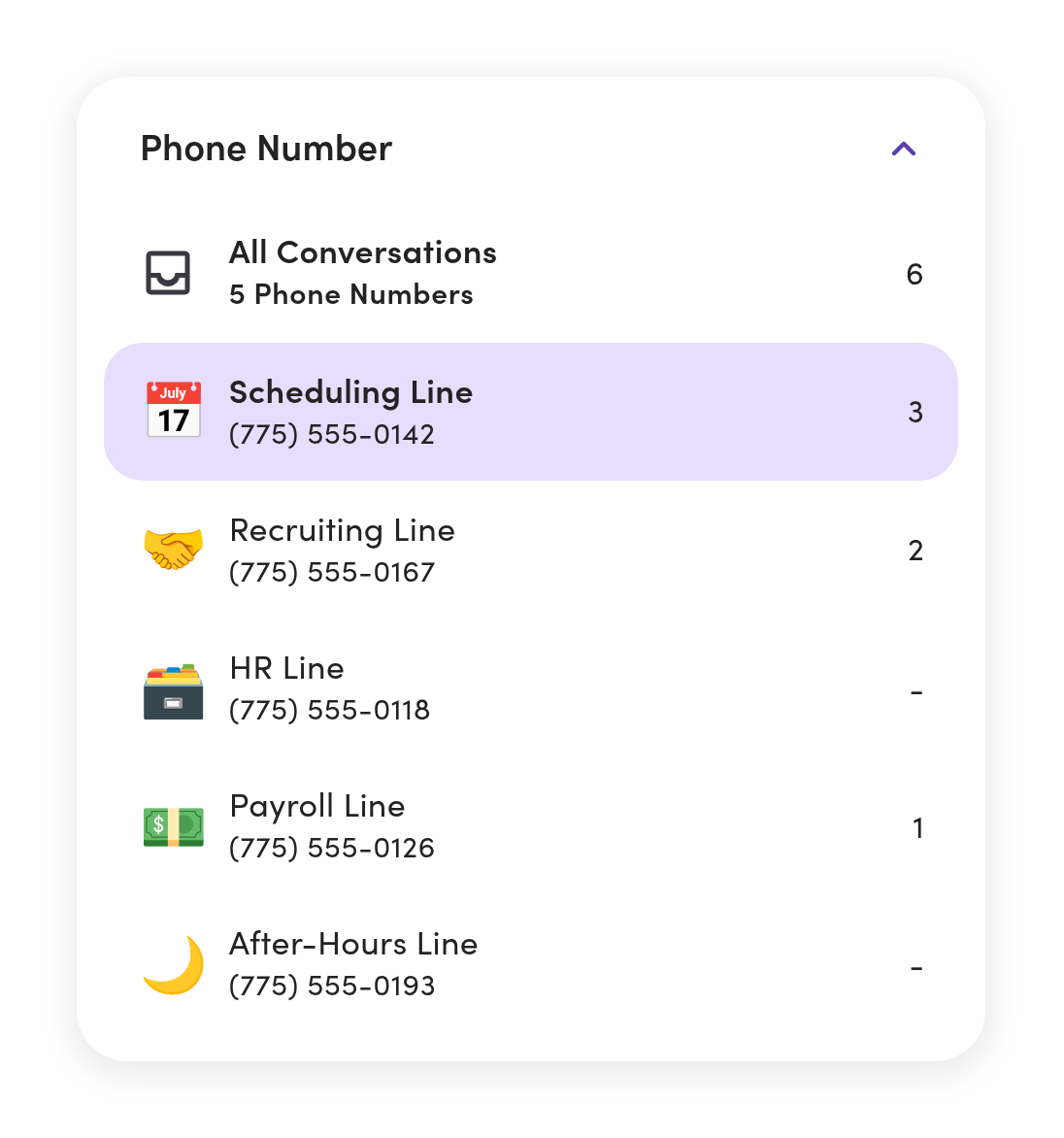
Scheduling, recruiting, HR, and payroll each see what’s theirs.
Give each team its own number, or have several share one. Set who can see and send on every line, person by person.
Candidates and employees stop sharing one inbox.
Candidates text recruiting, employees text scheduling, and managers can see it all.
Nobody sifts through everyone else’s texts.
Custom roles limit each person to the lines, teammates, and labels they need. Notifications can follow only the conversations assigned to them.
The after-hours line stays for after hours.
When an employee texts it about something routine, an automatic reply points them to the right number.
A new branch gets one more phone line, not a new system.
Add a line for each office as you grow, all in one workspace.
Hiring & HR updates
Texts, images, and links go where people actually reply.
Text interview reminders, start dates, onboarding steps, payroll reminders, and benefits deadlines, and route replies to the right owner.
Tomorrow’s reminders go out tonight.
Schedule a text for the time it should arrive. Save the ones you send every week as message templates the whole team shares.
Your checklist lives in the text thread, not lost in email.
Send PDFs, links, and photos right in the conversation and keep a record of it all.
Payroll, benefits, and urgent updates reach everyone.
Send a pay-date reminder, tax form, open enrollment link, or notice to every employee at once. Replies come back to payroll or HR as private conversations.
New applicants hear back right away.
When someone texts “apply,” a Relay replies with your application link.
HR system sync
Your contact list stays up to date without a weekly upload.
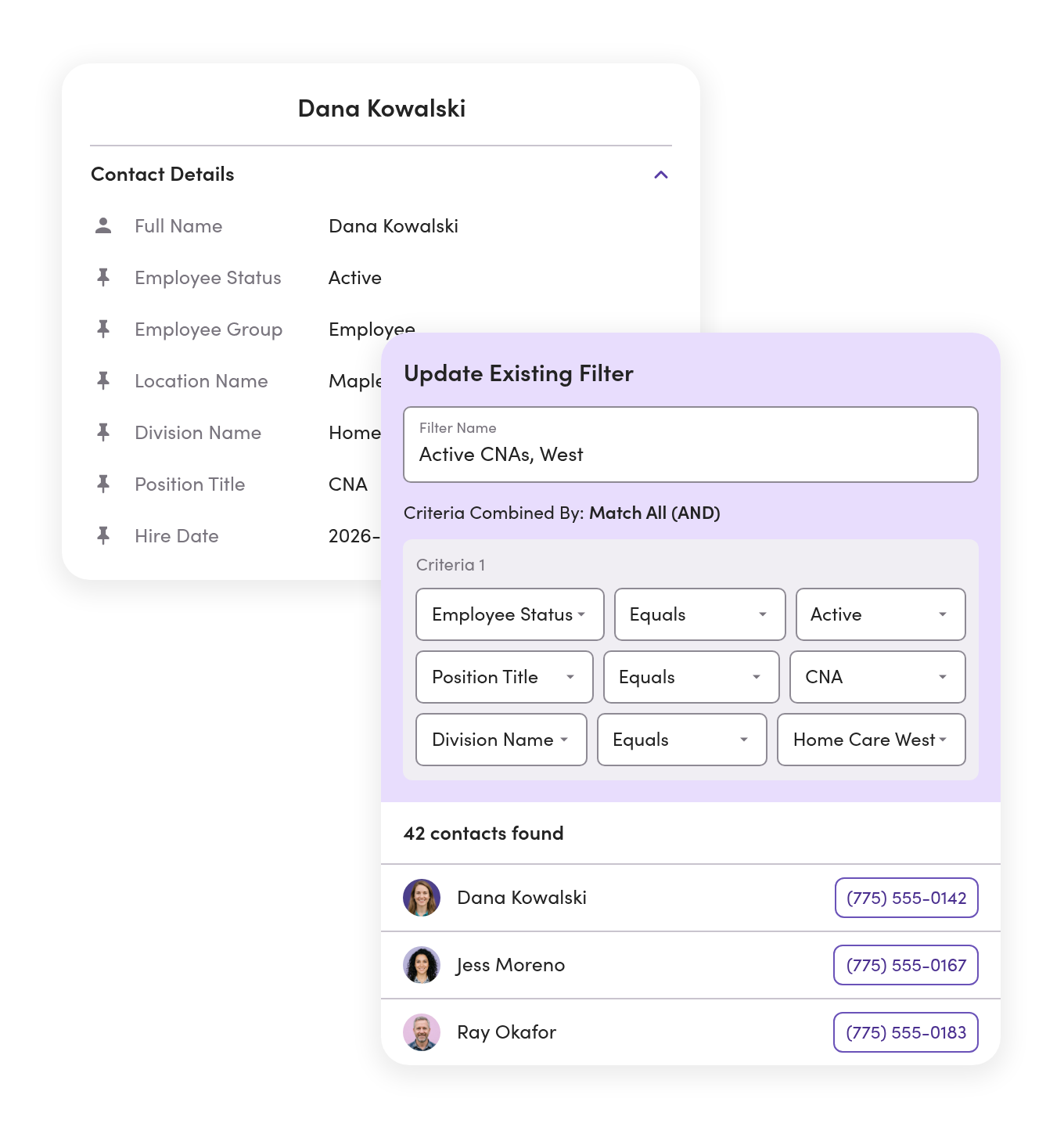
Connect your HR systems to MessageDesk. Save filtered lists using custom fields like hire date, location, status, position, and division.



You’re ready to text new hires on day one.
When your HR system adds someone, MessageDesk creates the contact with their details filled in. Phone numbers and details come in ready, with no retyping.
Filter former employees out of your lists.
Saved filters run on custom fields. When a status changes, that person falls out of every list built on it, so your next broadcast skips anyone who doesn’t match.
Every text tied to the candidate or employee’s record.
Connect Bullhorn or your ATS, and recruiters’ conversations log back to the candidate, so the next recruiter sees what was already asked.
Your HR system stays your system of record.
MessageDesk keeps only the fields your team needs to send the right message. Connections run inside MessageDesk, so there’s no extra app for IT to approve.
Lists & records
Opt-outs are handled, and message history stays with you.

No sync yet? Start with a spreadsheet.
Import a CSV of up to 5,000 rows with your custom fields mapped. Matching phone numbers update instead of creating duplicates.

Opt-outs are tracked for you.
When someone replies STOP, MessageDesk records it and blocks texts to that number across your lines.

People leave, but the conversations stay.
Every text stays on your business numbers with its full history. Export a thread when you need a record of who contacted whom and when.
Phone numbers
Add texting to the numbers your employees already know.
Most HR, staffing, and hiring teams text-enable the office number on their job posts and website. Calls stay on your phone system.



Landline or VoIP number
Turn on texting for the numbers you already use for calling.

Google Voice number
Port it to MessageDesk and keep texting on the same number.
A new number
Pick a local or toll-free number for a new branch or a new team.

Your Twilio account
Connect your existing Twilio numbers to MessageDesk.
HR & staffing in your industry
See how industries like yours text.

Healthcare, long-term care, and clinics
Shift coverage and staff updates, without texting PHI.
See the setup

Multi-location and franchise ops
Hiring and scheduling across every location from one workspace.
See the setup
Regulated industries
Finance, law, insurance, and accounting firms that need every text on record.
See the setupAdditional resources
More on texting for HR, staffing, and recruiting.

Text Messaging for Staffing Agencies: How to Text Candidates at Scale
Why texting works for staffing agencies and recruiters, plus 17 templates and examples.
Read more
Employee Text Messaging System: A Guide for Operations & HR
Guide to using employee text messaging systems to communicate with employees and staff.
Read more
How Staffing Teams Use Text to Apply at Scale
Guide to texting software for recruiting and text to apply, plus recruiting text message examples.
Read moreStaffing and HR texting questions.
No. They text your number the way they text normally. Nothing changes on their end.
If the line is text-only, a Relay can text the caller right back with where to call or what to send. Numbers on your phone system keep ringing where they do today.
Yes. Staffing teams text shift times, locations, call-outs, and coverage requests every day. Keep patient health information out of texts. MessageDesk doesn’t offer a BAA today.
Yes. Set access for every line, person by person. Managers can see across all of them.
Yes. A broadcast sends one message to everyone you pick, each by name, and every reply comes back as its own conversation.
Yes. Connect SAP SuccessFactors, Workday, ADP, UKG, BambooHR, or Bullhorn from inside MessageDesk. New hires come in with their custom fields, status changes update your saved lists, and texts can log back to the employee or candidate record.
MessageDesk records the opt-out and won’t text that number again. You don’t have to track it by hand.
Yes. Single sign-on with Microsoft Entra ID is available on Enterprise.
Yes. Analytics show messages sent and received, delivery, and activity by phone line and by teammate.
No. Recruiters working on their own use MessageDesk too. If you’re already on Twilio, connect your account and keep your existing registration.
Fill your next shift from one shared inbox.
See how your schedulers, recruiters, and lines would work in MessageDesk in a 20-minute demo.
No annual contract on Team or Pro. See pricing