Safety & training
Send Safety Alerts, Escalate Incidents & Track Training From One Shared Text Inbox
Text crews and field staff from the numbers you already have. See every report, who owns it, and who confirmed the alert.
Keep your phone system. Just add texting.


“Calls and email don’t work for our rig workers. MessageDesk makes it easy for our HR coordinators to send texts for everything from onboarding to benefits.”
Alex S. · VP HR, Energy Services Company
Texting today
Crews don’t read email or catch a call, but they text. Where do those texts go?

Texting from an on-call phone?
The safety phone gets passed from shift to shift. Last week’s reports go home with whoever had it.

Texting from personal phones?
Techs text whoever they know on the safety team. When that person is off shift, the report waits.

Group texts or mass-text tool?
Group texts show everyone’s number. Replies pile up, and nobody can tell who confirmed the alert.

Is your main line textable?
Many VoIP lines can’t text, so after-hours reports end up as voicemails in an inbox nobody checks.
The safety line
Every report gets an owner, from the first weather hold to the last call of the night.
5:45 a.m. · Weather hold
Lightning is near the site. One text tells every crew to hold work, and each “ACK” comes back labeled Acknowledged.
7:00 a.m. · Toolbox talk
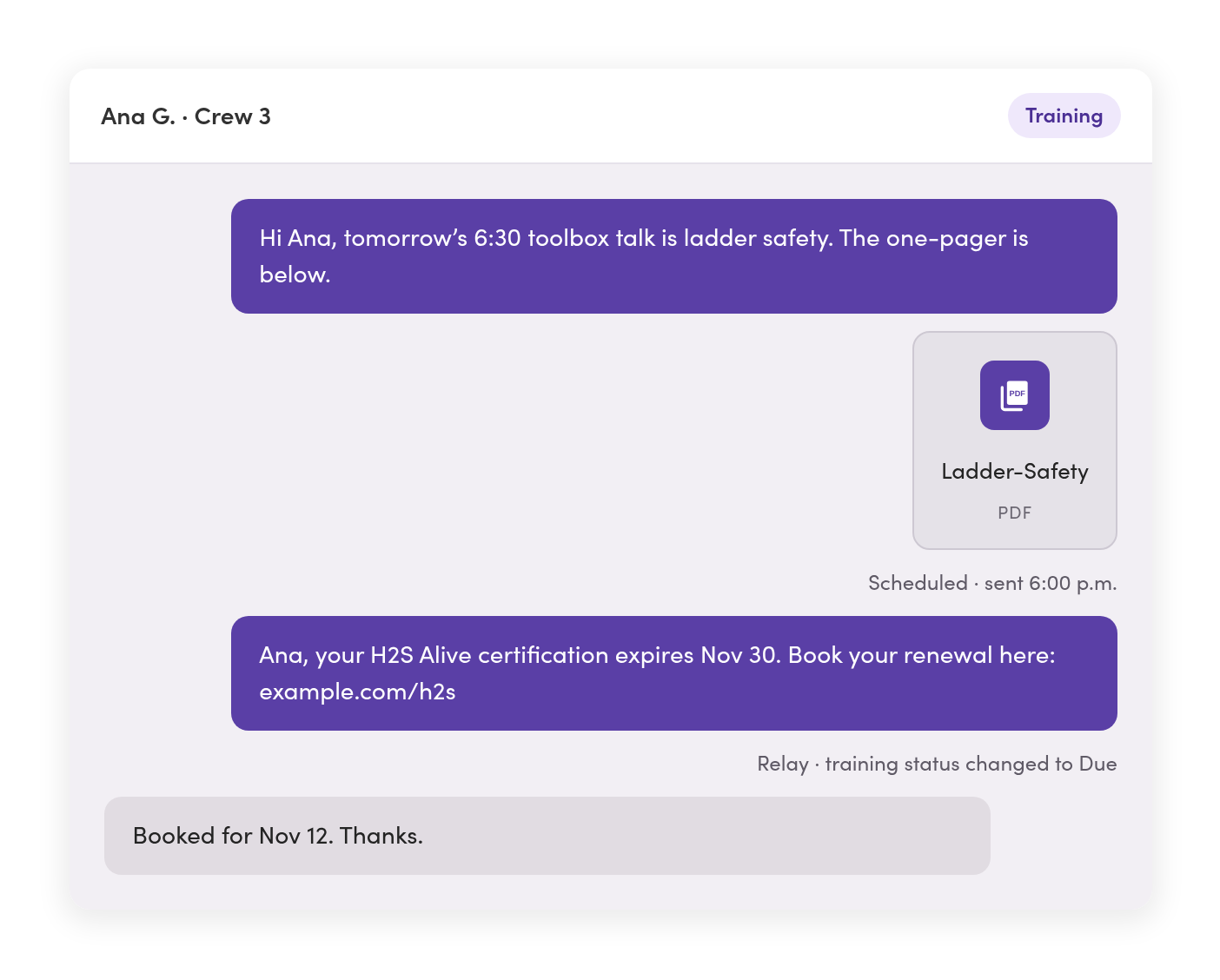
This week’s topic and a one-page PDF go to every crew lead before the morning meeting.
2:15 p.m. · Incident
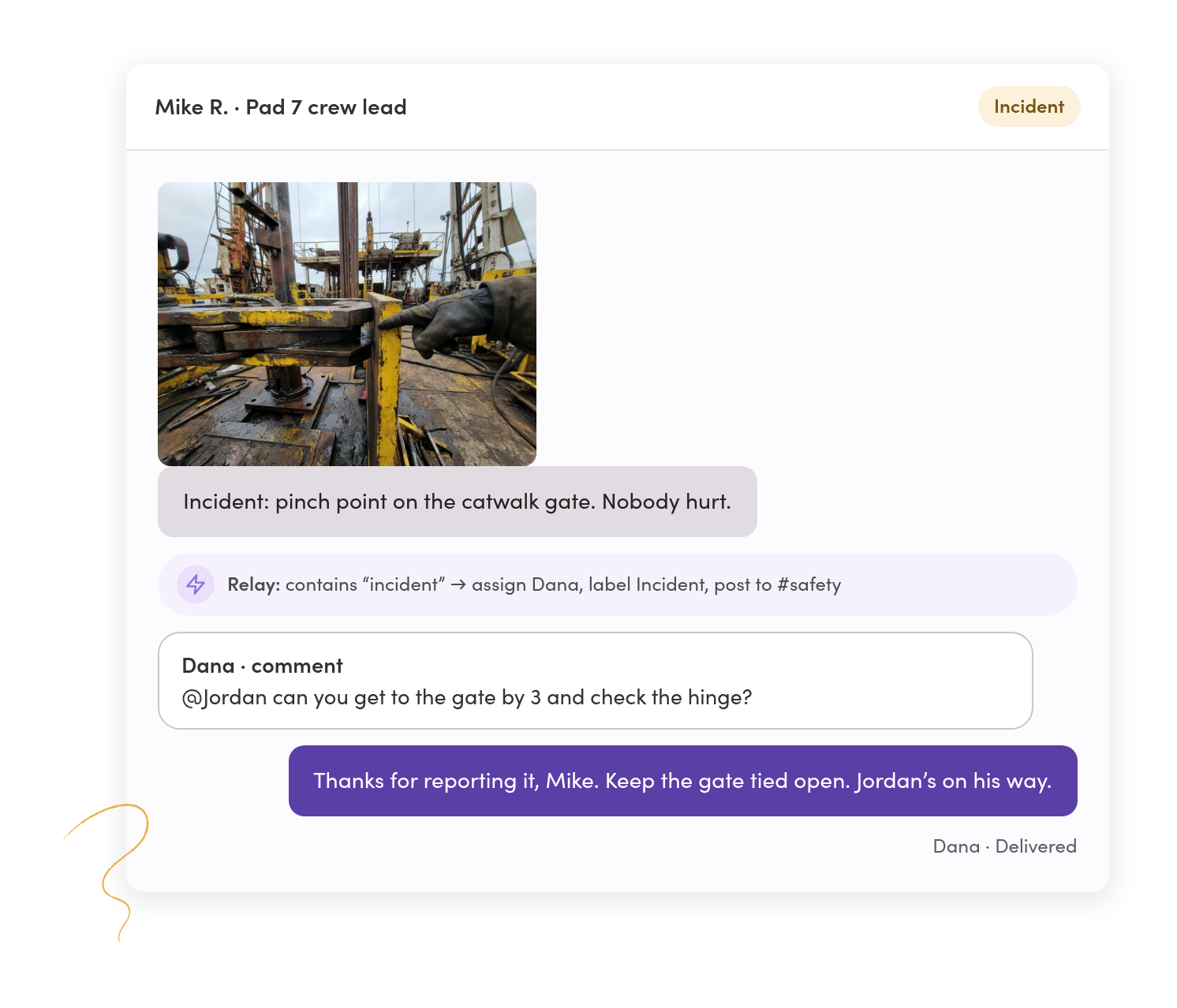
A tech texts “incident” with a photo. It’s assigned to the safety lead and posted to the safety channel in Teams.
9:40 p.m. · After hours
A driver texts the main line about a near miss. The on-call safety contact owns the reply.
Alerts & acknowledgements
Send the alert once. Every confirmation comes back labeled.
Pick crews by label or saved filter, like site, region, or role, and text all of them at once. Each reply comes back as its own private conversation.
Confirmations sort themselves.
A Relay spots “ACK” and labels the thread Acknowledged. Filter by that label to see who’s confirmed.
Crews never see each other’s numbers.
Every person gets their own copy, and their reply comes back only to your team.
You know which texts didn’t arrive.
Each message shows delivered or failed. A Relay can reopen any failed text and assign it, so someone follows up another way.

Reports & escalation
A report from the field reaches the safety lead, not voicemail.
Crews text the safety line with what happened and a photo. A Relay gives it an owner and alerts the rest of your safety team.
Incident texts get an owner right away.
When a text contains “incident,” a Relay assigns your safety lead and labels the thread.
Your safety channel hears about it too.
The same Relay posts the report to Microsoft Teams or Slack, so the whole team sees it where they already work.
The team talks it through without the crew seeing.
Leave internal comments, @mention a teammate, and attach the JSA or a photo. The contact never sees them.
After-hours reports go to whoever’s on call.
Set the hours, and a Relay assigns texts outside them to your on-call contact.
Training & certifications
Training reminders go out before a certification lapses, not after.
Text toolbox talks, course links, and renewal reminders, and send each one to the crews it’s for.
Tomorrow’s toolbox talk goes out tonight.
Schedule a text for the time it should arrive. Save the ones you send every week as templates the whole team shares.
The handout lives in the thread.
Send PDFs, photos, and course links right in the conversation, with a record of what went to whom.
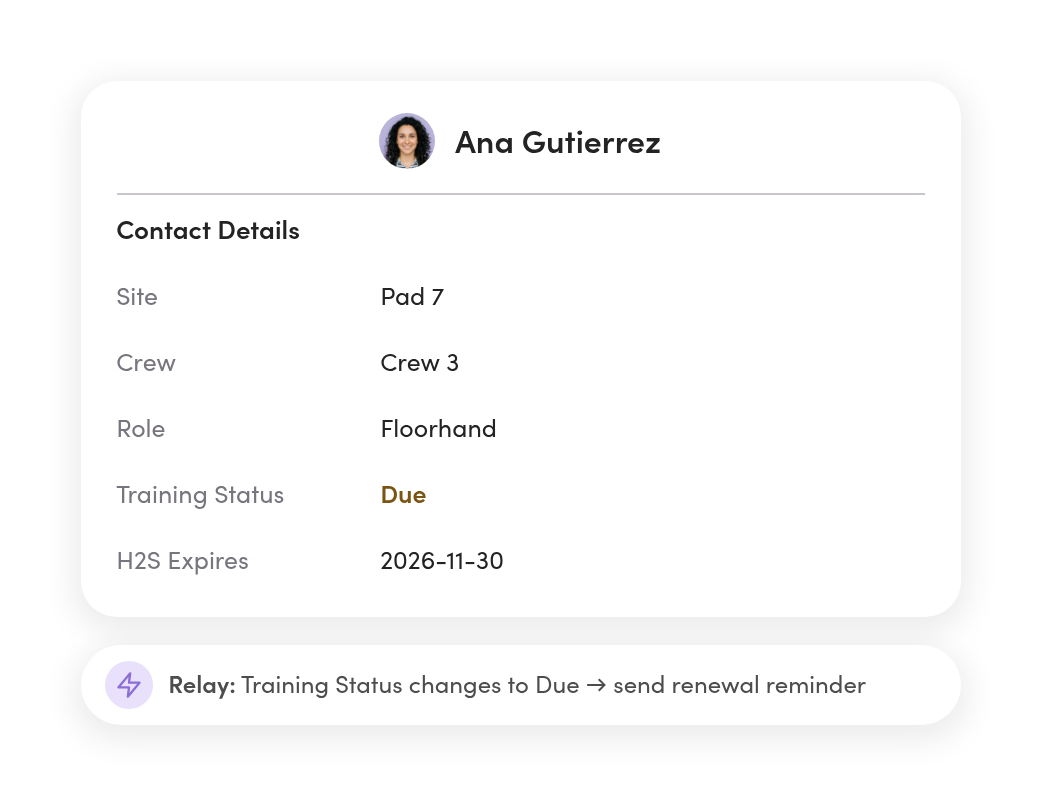
Renewal reminders send when the record changes.
When a contact’s training status changes to Due, a Relay texts the reminder with their name, course, and expiry date filled in.
New hires get orientation details on day one.
When a new crew member is added as a contact, a Relay texts where to go for orientation and what to bring.
Lines & access
Safety, dispatch, and HR each see what’s theirs.
Give safety its own number, or share one with other teams. Set who can see and send on every line, person by person.
Reports stop getting lost between load questions.
Crews text the safety line about hazards and the dispatch line about loads. Managers can see both.
Each person sees the lines they need.
Custom roles limit each teammate to the lines, labels, and conversations their job calls for.
Start with safety, then bring in operations.
Add teammates and lines as other departments come on, all in one workspace.

Systems sync
Alerts reach the tools your safety team already watches.
Post escalations to team chat, keep your crew roster current, and send every report to the system you keep records in.




Escalations show up in Teams or Slack.
Incidents, after-hours reports, and failed alerts post to the channel your safety team watches.
Your crew roster stays current.
Sync contacts from Google Sheets or BambooHR with custom fields like site, crew, role, and training status.
Your safety system stays the system of record.
Send each report out by to the system you already use. MessageDesk keeps only what your team needs to text the right people.
Records & compliance
Every report stays on record, ready for the incident review.

Export the full thread.
Download a PDF of any conversation with timestamps, internal comments, and photos inline.

Opt-outs are tracked for you.
When someone replies STOP, MessageDesk records it and blocks texts to that number across your lines. A Relay can label it so you reach them another way.

People leave, but the reports stay.
Every text stays on your business numbers with its full history. Stream each message to your own retention system if your policy calls for it.
Phone numbers
Add texting to the number your crews already call.
Most safety teams text-enable the main line or the on-call number crews already have saved. Calls stay on your phone system.



Landline or VoIP number
Turn on texting for the numbers you already use for calling.

Google Voice number
Port it to MessageDesk and keep texting on the same number.
A new number
Pick a local or toll-free number for a dedicated safety line.

Your Twilio account
Connect your existing Twilio numbers to MessageDesk.
Safety & training in your industry
See how industries like yours text.


Additional resources
More on texting field crews.

How Oil and Gas Companies Text Field Crews Who Don’t Use Email
How oil and gas teams use texting to reach crews on remote sites.
Read more
How Construction Companies Text Field Crews and Drivers
How construction teams text crews, subs, and job sites.
Read more
Employee Text Messaging System: A Guide for Operations & HR
Guide to using employee text messaging systems to communicate with employees and staff.
Read moreSafety and training texting questions.
No. Emergencies go to 911 and your emergency line first. Use texting for reports, updates, and anything that should be on record after the call.
No. They text your number the way they text anyone. Nothing changes on their end.
Yes. A Relay labels every “ACK” reply as Acknowledged, so you can filter for who’s confirmed.
Every message shows delivered or failed. A Relay can reopen a failed text and assign it, so someone reaches that person another way.
A Relay assigns the text to your on-call contact and can post it to your safety channel. Or it replies with the number to call.
Yes. Photos, PDFs, and other files come into the thread and stay with the conversation.
Yes. Export any conversation as a PDF with timestamps, internal comments, and photos, or export message history as a CSV.
Yes. Relays can post new reports, escalations, and failed sends to the channel your team watches.
Yes. Set access for every line, person by person. Managers can see across all of them.
MessageDesk records the opt-out and won’t text that number again. A Relay can label the conversation, so you know to reach that person another way.
Get every safety-related text into one shared inbox.
See how your safety line, crews, and alerts would work in MessageDesk in a 20-minute demo.
No annual contract on Team or Pro. See pricing