Healthcare & long-term care
Healthcare Text Messaging: Every Shift, Caregiver & Front-Desk Text in One Shared Inbox
Text caregivers, nurses, and families from your own numbers. Everyone sees the same threads and knows who owns each one.
Keep your phone system. Just add texting.


“A caregiver’s reply was up here and now it’s way down here, and it’s out of sight, out of mind.”
Operations lead · Multi-location home care agency, on her old texting tool
Texting today
Caregivers and nurses don't answer calls or check email, but they do respond to texts.
Texting from the scheduling phones?
Two or three company cells sit on the scheduling desk. Whoever has the right one sees the call-out. Nobody else does.

Texting from personal phones?
Therapists and schedulers give out their own cells or a Google Voice number. Parents and staff text them at 10 p.m., and the thread leaves when they do.

Texting on the phone system?
The main line only takes calls, or its texts sit with one user. So the office shares a login, and nobody can tell who already answered.

Blasting open shifts from a mass-text tool?
The shift goes out to everyone. Then the replies pile up in one list, and two schedulers book the same caregiver while a third yes gets missed.
Shifts & schedules
Every text has an owner, from the first call-out to the last question of the night.
5:40 a.m. · Care home
A PSW texts that she’s sick. A Relay labels it Call-out and assigns the scheduler on duty, who texts the open shift to the weekend pool.
9:15 a.m. · Home care
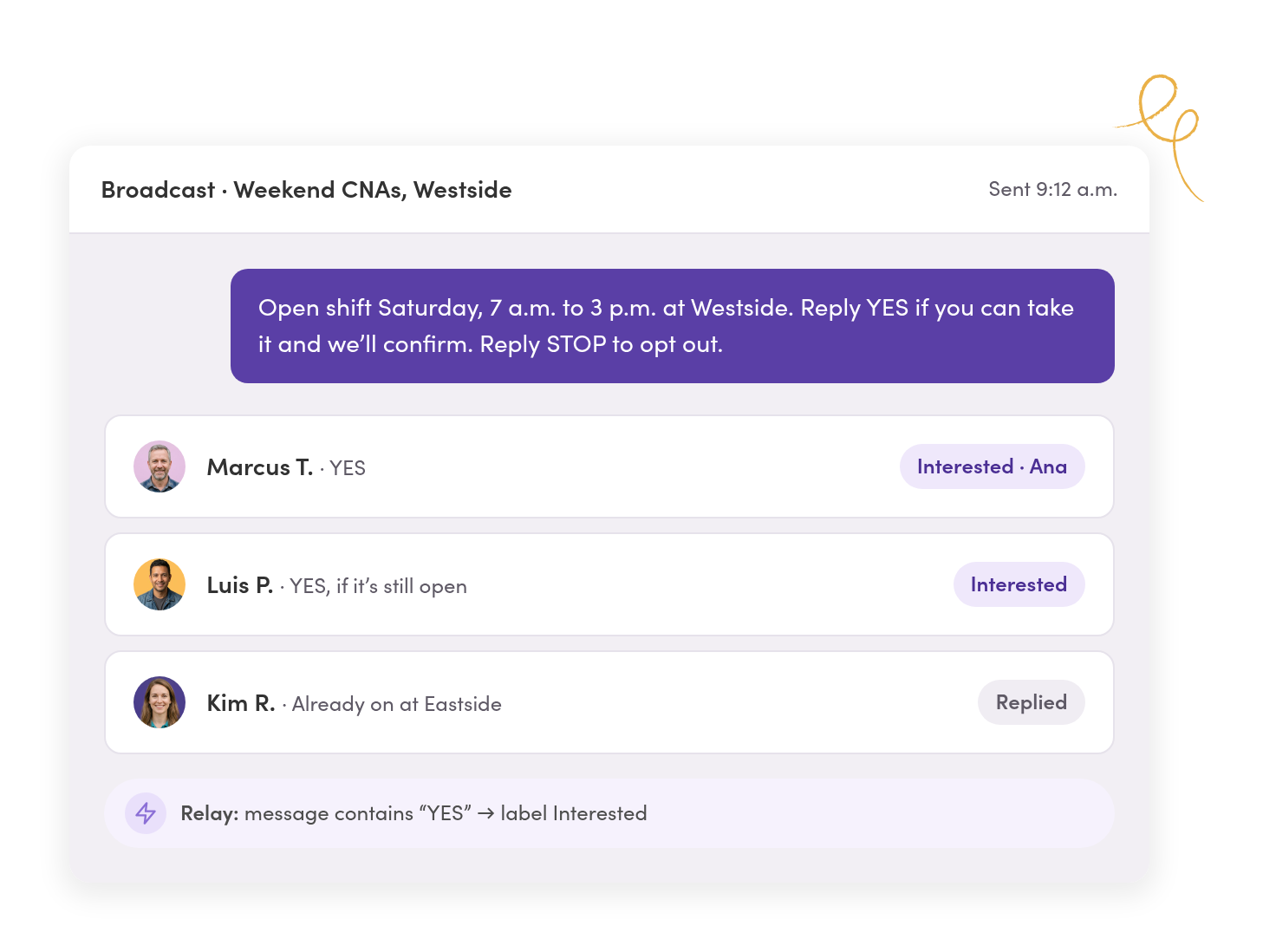
Three caregivers reply YES to an open Saturday shift. The first reply is assigned, so only one scheduler books it and the others hear back.
2:30 p.m. · ABA clinic
A parent texts the clinic number to move tomorrow’s appointment. The front desk answers, and the therapist sees it without giving out her cell.
8:50 p.m. · After hours
A nurse texts the staffing line about next week. An after-hours reply points urgent issues to the on-call RN line, and the thread waits for the morning.
Shifts & call-outs
Call-outs reach the scheduler on duty, and every open shift gets filled once.
Caregivers and nurses text one scheduling number. Your whole scheduling team sees each text as it comes in, and each one has a single owner.
Two schedulers never work the same text.
Assign a thread and everyone sees who has it. A Relay can assign texts on the scheduling line and label them Call-out or Availability as they arrive.
Nothing sits with whoever’s off today.
Reassign a scheduler’s threads when they’re out, and the history goes with them. Comments in line tell the next shift what’s already done.
The team decides without the caregiver watching.
Internal comments and @mentions sit right in the thread, so the coordinator can check coverage before anyone replies.

Staff updates & open shifts
Open shifts and staff notices reach every phone, and each reply comes back private.
Text open shifts, in-service reminders, and policy updates to the staff who need them. Each person gets their own copy, and each reply comes back as its own conversation.
Pick staff by location, role, or shift.
Text everyone with a label or saved filter at once. Nobody sees anyone else’s number, and nobody gets stuck in a group text.
The notice on the break-room wall goes to their phones.
Attach a PDF or image to any text or shared template, so the in-service schedule or the new policy arrives where staff will read it.
Staff don’t install another app.
Caregivers and nurses answer from their regular texting app. When someone replies STOP, MessageDesk records it so you can reach them another way.
Front desk & families
Families text the clinic’s number, and therapists stop handing out their own.
Add texting to your existing numbers. The front desk handles reminders, scheduling, and closures, and the right therapist sees what they need.
Reminders go out without anyone typing them.
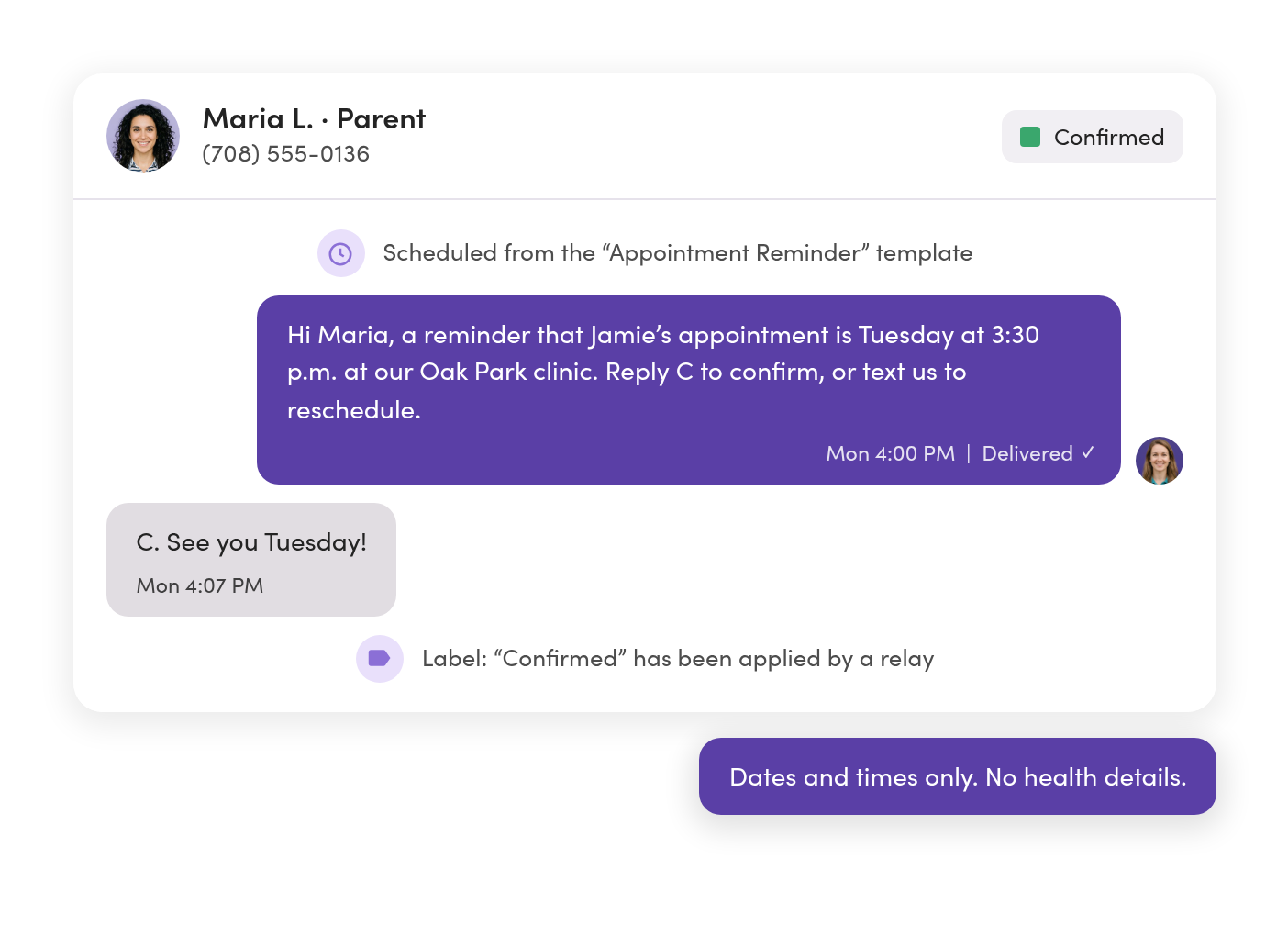
Schedule texts ahead from shared templates with the family’s name filled in. A Relay labels a C reply Confirmed, so the front desk only chases the rest.
Closures reach every family at once.
Send a snow day or holiday closure as a broadcast. Questions come back one-on-one, never into a group thread.
Health details stay off the text.
Keep texts to dates, times, and logistics. Templates make it easy for the whole front desk to send the same safe wording every time.
Locations & lines
Each branch and team works its own number, and the office sees all of them.
Put scheduling, each branch, the clinic front desk, and the on-call line in one workspace. Then set who can see and send on each one, person by person.
Directors see every branch from one place.
All Conversations shows every line at once, and each line keeps its own unread count, so you can spot the branch that’s falling behind.
Each team sees only what it should.
Give each teammate Owner, Editor, Viewer, or No Access on every line. Schedulers stay out of HR threads, and the on-call RN line stays with the RNs.
Off-hours texts point to the right number.
An after-hours Relay replies with the on-call number and holds the thread for the morning, so staff stop using the wrong line for scheduling.

Systems sync
New hires are textable on day one and off the list the day they leave.
Bring staff in from your scheduling or HR system with custom fields like location, role, and status. Saved filters pick the right people every time.




A new hire’s first text sends itself.
When someone’s status changes to Active, a Relay texts where to report for orientation, with their name filled in.
Schedule changes can start a text.
A new or changed shift in your scheduling system can text the caregiver through Zapier or a webhook, and the reply comes back to the shared inbox.
Your scheduling system stays your system of record.
MessageDesk keeps only the fields your team needs to text the right people, and can send each conversation back by webhook.

Records & compliance
Text the logistics, keep health details out, and keep every thread on record.

Know what’s safe to send.
Shifts, staff updates, reminders without health details, and closures are fine by text. Diagnoses, care plans, and medications aren’t. We can’t sign a BAA today, so keep PHI in your secure tools.

Show what was sent and when.
Export any conversation as a PDF with timestamps and internal comments, or export message history as a CSV. Every text shows delivered or failed.

Staff texts stay off personal phones.
Texts live on your business numbers and stay when people leave. Opt-outs are recorded for you, and only teammates with Owner access to a line can delete messages.
For your IT and compliance team: MessageDesk is a SOC 2 Type II-certified platform with role-based access controls, Microsoft Entra ID sign-in, and audit-ready conversation history. See security & compliance →
Phone numbers
Keep the number staff and families already have saved.
Text-enable your main line or scheduling number, and calls stay on your phone system. Nobody has to learn a new number.
Our guided carrier registration walks you through what carriers ask for, and we review it before it’s submitted, so your texts don’t get filtered as spam.



Landline or VoIP number
Turn on texting for the numbers you already use for calling.

Google Voice number
Port it to MessageDesk and keep texting on the same number.
A new number
Pick a local number for a new branch, scheduling, or the on-call line.

Your Twilio account
Connect your existing Twilio numbers to MessageDesk.
Teams in healthcare & long-term care
See the setup for the team you run.



Additional resources
More on texting staff and running scheduling by text.
Text Messaging for Staffing Agencies: How to Text Candidates at Scale
Why texting works for staffing agencies and recruiters, plus 17 templates and examples.
Read more
Employee Text Messaging System: A Guide for Operations & HR
Guide to using employee text messaging systems to communicate with employees and staff.
Read more
How Multi-Location and Franchise Businesses Text Across Locations
Two ways to set up texting across locations, and how to roll it out.
Read moreHealthcare and long-term care texting questions.
We can’t sign a BAA today, so don’t send PHI by text. Use MessageDesk for shifts, staff updates, reminders without health details, and closures, and keep PHI in your secure tools. Our HIPAA evaluation is underway. If a BAA is on your timeline, talk to us and we’ll tell you where it stands.
No. Staff and families text your number the way they text anyone. No download and no login. Your team works the texts from a browser or the MessageDesk mobile app.
Yes. Text-enable your landline or VoIP number, including RingCentral, and calls stay where they are. Google Voice numbers can be ported to MessageDesk, so staff keep texting the same number.
Relays assign texts on the scheduling line as they arrive, and assignment shows everyone who owns each thread. Nobody answers twice, and nothing waits for someone who’s off.
Yes. Give each teammate Owner, Editor, Viewer, or No Access on every line, so a team only sees the lines it works.
An after-hours Relay can reply with your on-call number and assign the thread for the morning, so urgent issues go to the right line.
Yes. A broadcast sends each person their own copy, and replies come back as private conversations with your team.
Yes. MessageDesk supports Microsoft Entra ID single sign-on, so your team signs in with their work accounts.
Yes. MessageDesk supports US and Canadian numbers, so a care home in Ontario texts staff the same way an agency in Texas does.
Once you submit our guided carrier registration, approval typically takes one to three business days. You can keep the old phones running in parallel until everyone’s moved over.
Get every shift, caregiver, and front-desk text into one shared inbox.
See your scheduling, branch, and front-desk lines set up in MessageDesk in a 20-minute demo.
No annual contract on Team or Pro. See pricing