Connect Your Shared Inbox to the Systems That Run Your Operation
Your dispatch board, CRM, or in-house platform will send texts and sync contacts through MessageDesk, while your team works the replies together.
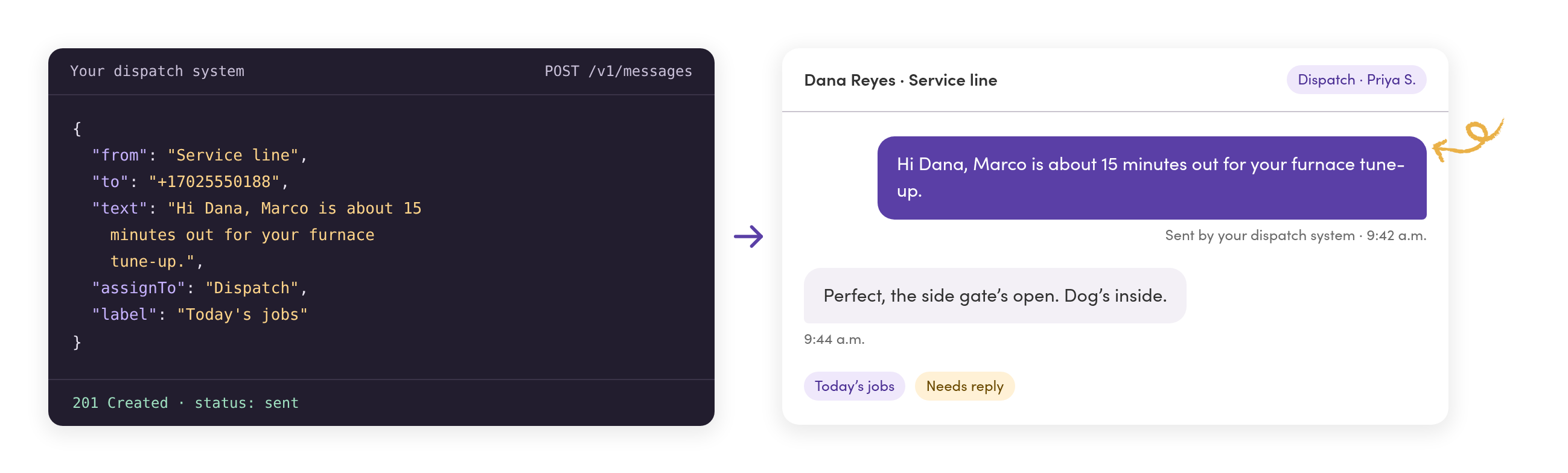
What teams want to build
Let the software that runs the job send the text.
These come from operators and developers who asked us for an API on calls. When you join, tell us which one you’d build first.
Trip updates · Medical transport
Riders get their ETA without anyone typing it.
Your dispatch system texts the pickup time and a tracking link. When a rider replies, the dispatcher on shift sees it in the shared inbox.
Follow-ups · Field service
The follow-up goes out the moment the job moves.
A job changes stage in your CRM, and the reminder or thank-you goes out from that location’s line. Replies go to the team at that shop.
Roster sync · Staffing
New hires are textable on day one.
Your HR system adds, updates, and removes workers in MessageDesk, custom fields included. Nobody retypes a phone number or cleans up duplicates.
Your own screens · Operations center
Your team texts from the tool they already have open.
Send and read texts inside your in-house platform. The same conversations stay in MessageDesk, with their full history and an owner on each one.
Records · Financial services
Every conversation ends up in your system of record.
Pull texts and replies into your CRM or data warehouse on your own schedule, so reporting and recordkeeping don’t wait on an export.
Delivery status · Home care
You know which reminders didn’t go through.
Your scheduling system checks the status of each visit reminder and flags the ones that failed, so the office calls those clients first.
Waitlist
Join the waitlist, and tell us what you want to see first.
Waitlist members hear first when it’s ready to try. Your answers help us decide which endpoints we open up first.

Today and next
Webhooks tell your systems when something happens. The API will let them ask.
You don’t have to wait to connect MessageDesk. Webhooks and Zapier cover a lot today. The API adds the questions they can’t answer.
Webhooks and Zapier
Available now- Send new texts, closes, assignments, and opt-outs to an endpoint you control.
- Let your booking tool or CRM start a text with an inbound webhook.
- Connect the apps your team already uses through the MessageDesk app on Zapier.
The MessageDesk API
Coming soon- Ask for conversations, messages, and contacts whenever your system needs them.
- Keep contacts in step with the system you treat as the source of truth.
- Build sending and replying into your own screens.
- Check delivery status on the texts your system sends.
How we’re building it
Your systems follow the same rules your team does.
An API shouldn’t open a side door into your texts. These are the rules we’re building on.
It sees what the person sees
Requests run as the person who connected them and reach only what that person can see in MessageDesk. Our Developer API already works this way.
Texts stay in the shared inbox
Texts your system sends go out from your business number and show up in MessageDesk with audit-ready conversation history, so every reply has an owner.
Opt-outs still count
MessageDesk won’t text a number that opted out, whether the text starts in the app, in a Relay, or in your code.
Your system stays the source of truth
MessageDesk isn’t trying to be your CRM or HR system. The API keeps it in step with the one you already run.
API questions.
Yes, for one connection. Our Developer API runs the MessageDesk app on Zapier, and its endpoints are documented so you can see what an integration does. Connecting your own app to it isn’t self-service yet. That’s what the waitlist is for. Read the Developer API docs
We haven’t set a date. Waitlist members hear first when it’s ready to try.
JSON over HTTPS, secured with OAuth 2.0, like the Developer API that runs our Zapier app today. The waitlist sees the details first.
Pricing isn’t set yet. The waitlist hears it first.
MessageDesk is built for operations texting: the texts a team sends, answers, and keeps a record of. We’re building the API for the same work. If you’re planning large campaigns, tell us your volume in the form.
The API is for your developer and your systems. The MCP server is for the AI assistant your team uses. We’re building both, and each has its own waitlist. See the MCP server
Your systems already know when a text should go out.
Join the waitlist for updates and more information regarding our API.